
Add Bank Account at LUCKYTOWN PLUS - Complete Guide

How to Add a Bank Account on LUCKYTOWN - Step-by-Step


Step 1 - Click "ME" on the Bottom Right Corner of the Main Page
To add a bank account on LUCKYTOWN, first log in to your account. On the main page dashboard, click the "ME" icon at the bottom right corner. This opens your personal account menu where you can access Cash, Chip, Top Up, Withdraw, Info, Announcement, and game provider shortcuts.
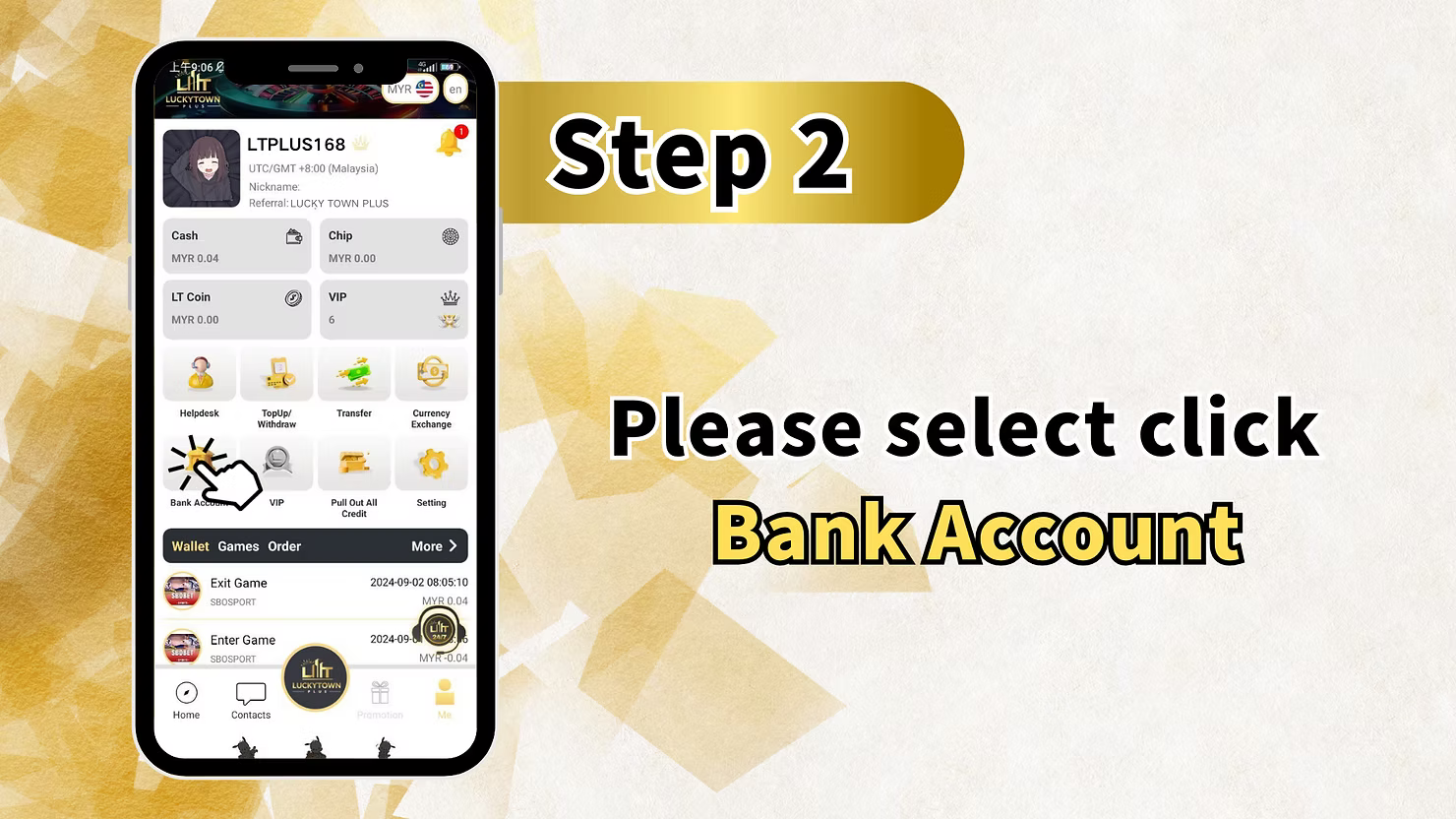
Step 2 - Select "Bank Account"
After entering the "ME" section, look for and click "Bank Account". This takes you to the bank account management page where you can view existing accounts or add a new one for withdrawals.
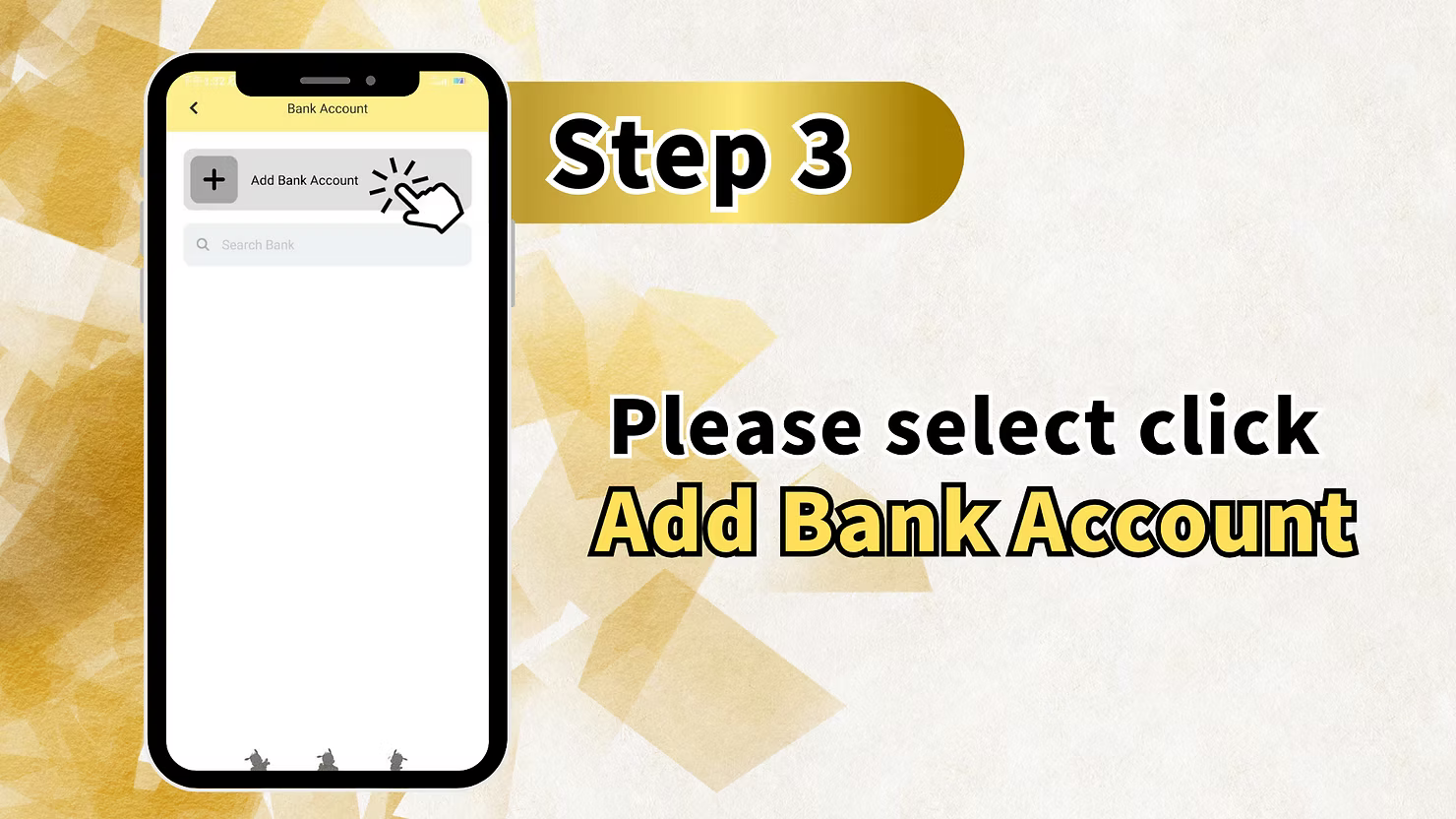
Step 3 - Click "Add Bank Account"
On the Bank Account page, click the "Add Bank Account" button. This opens the account addition form. You may also see a "Search Bank" option to help locate your bank more quickly if the list is long.
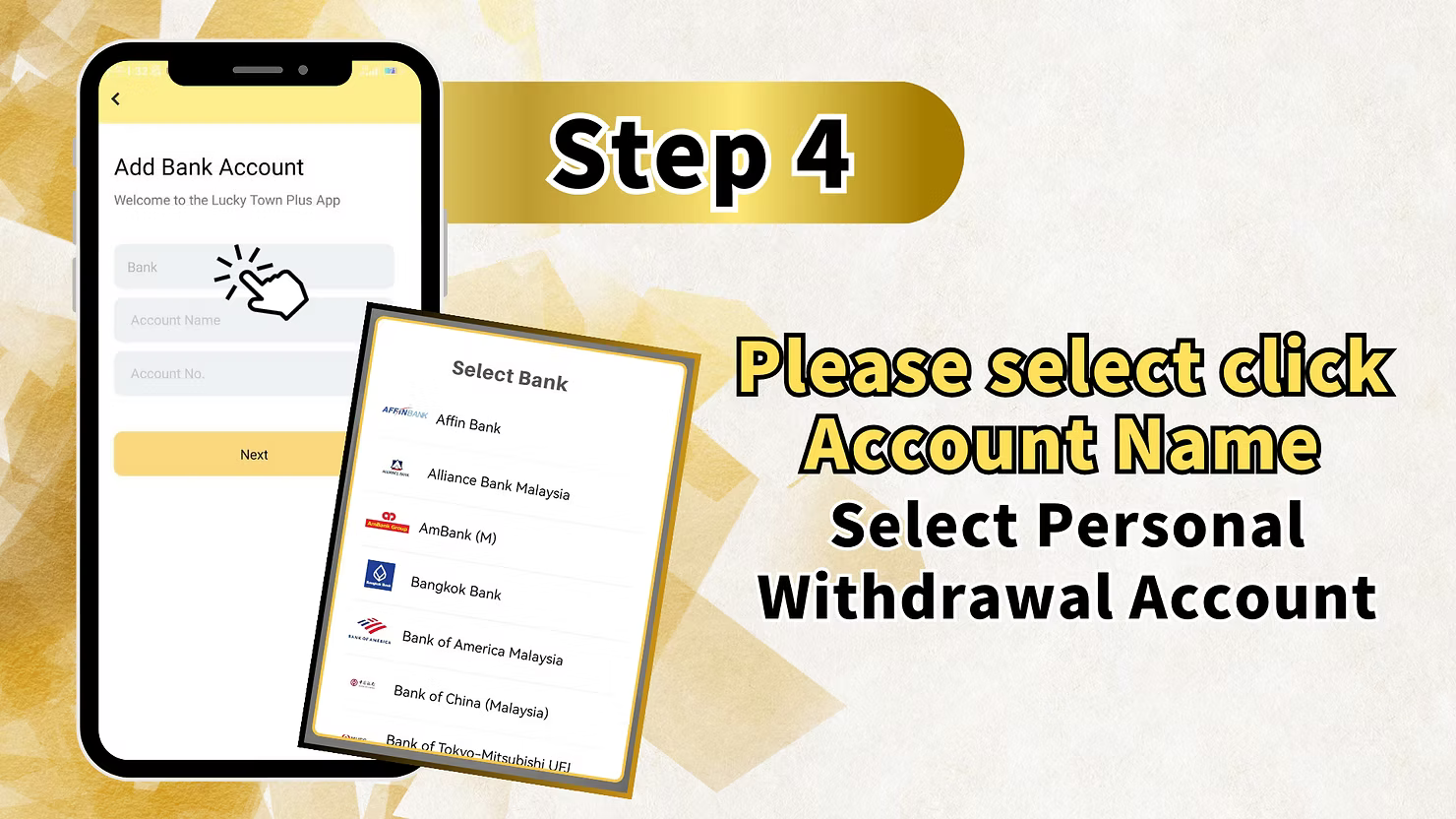
Step 4 - Select Your Bank and Enter Account Details
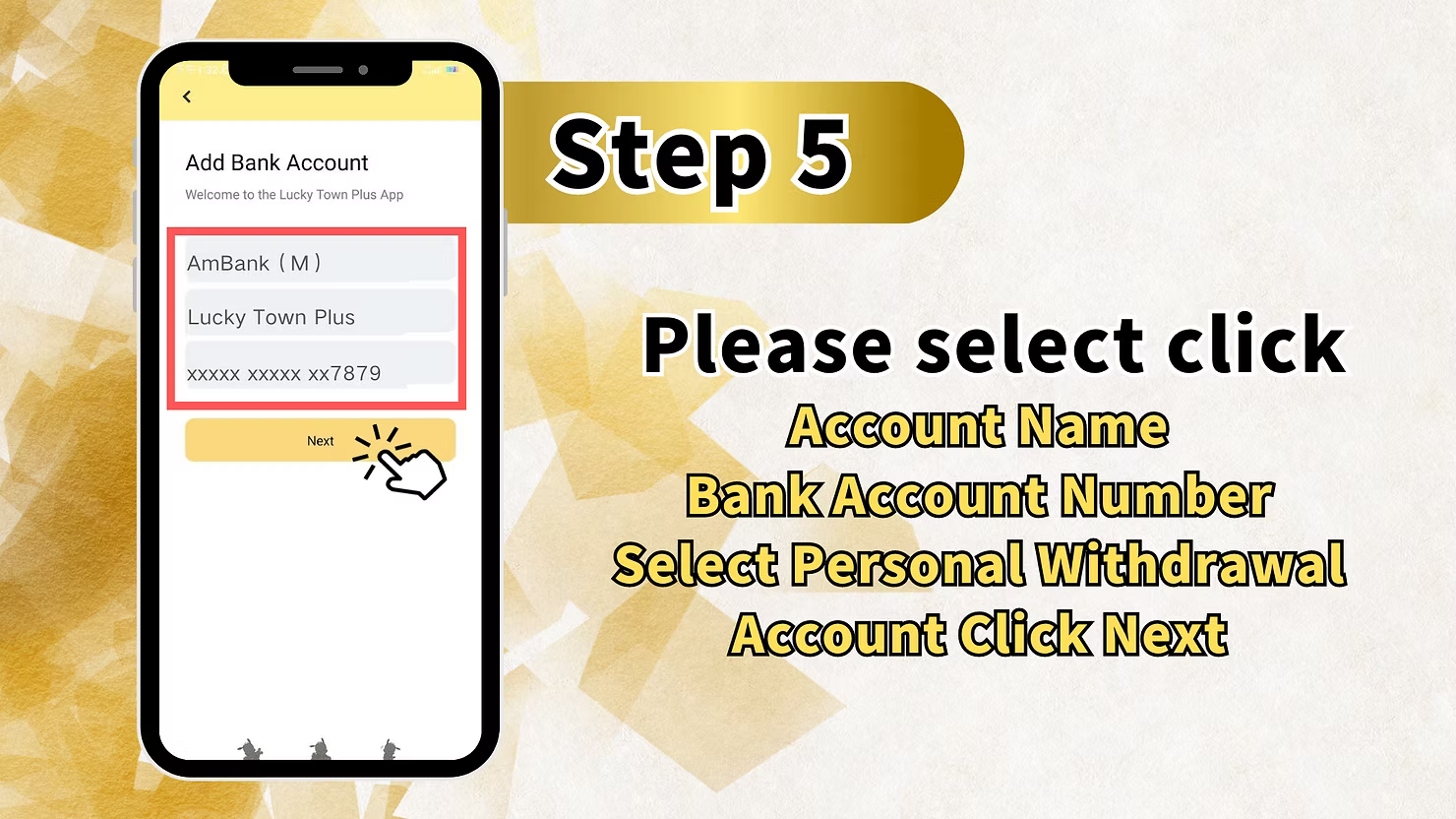
In the Add Bank Account form, fill in the required fields. Select your bank from the dropdown list, for example Affin Bank, Alliance Bank Malaysia, AmBank, Bangkok Bank, Bank of America Malaysia, Bank of China Malaysia, Bank of Tokyo-Mitsubishi UFJ, and many others. Enter your account holder name exactly as it appears on your bank account and make sure it matches your LUCKYTOWN registered real name. Then enter your bank account number and select "Personal Withdrawal Account" as the account type. Click "Next" to proceed.
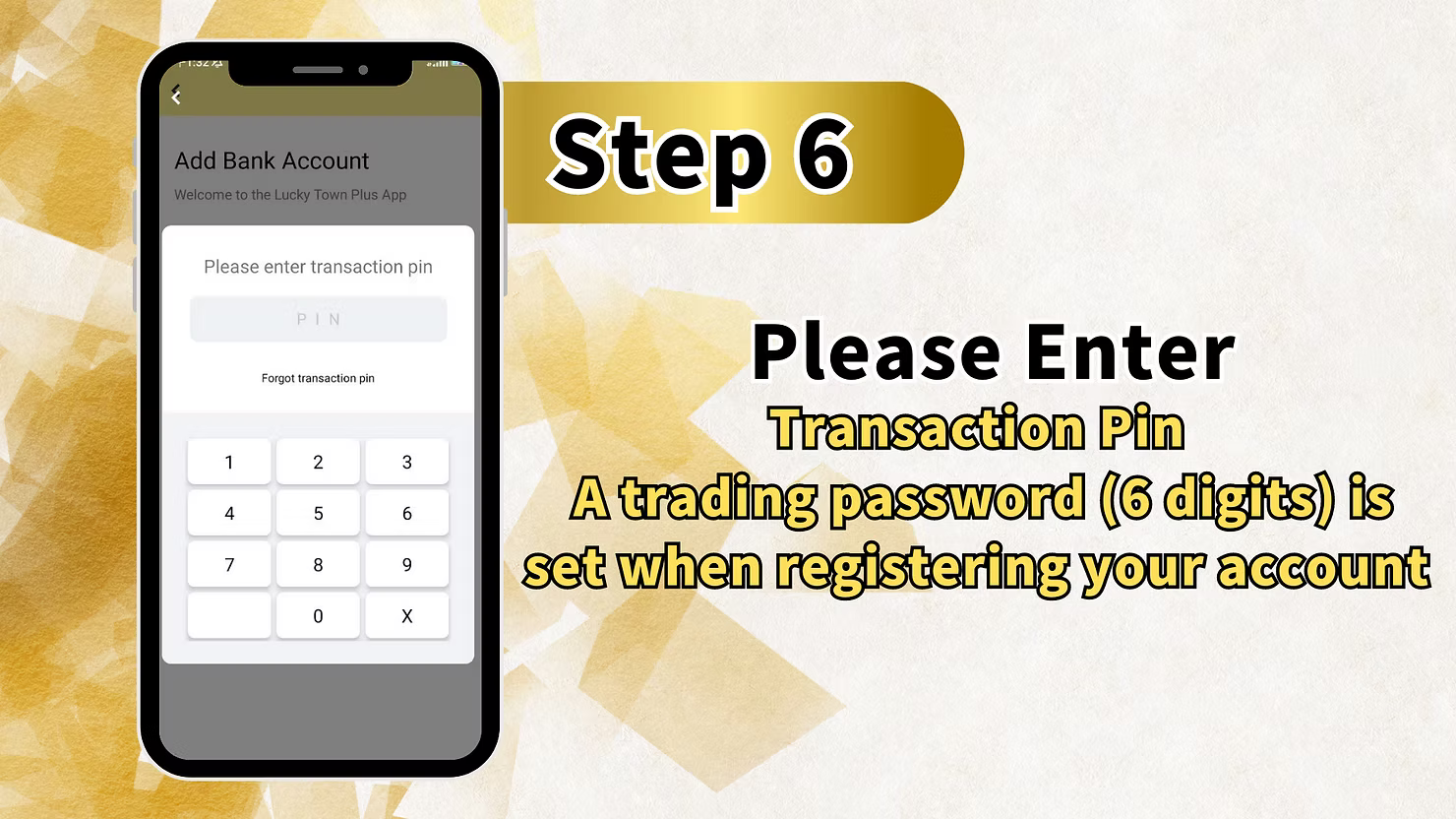
Step 5 - Enter Your Transaction PIN (6 Digits)
For security verification, LUCKYTOWN will ask you to enter your 6-digit transaction PIN, also known as the trading password. This PIN was set when you registered your LUCKYTOWN account. If you have forgotten it, click "Forgot transaction pin" to reset it. Enter the PIN using the numeric keypad and confirm to continue.
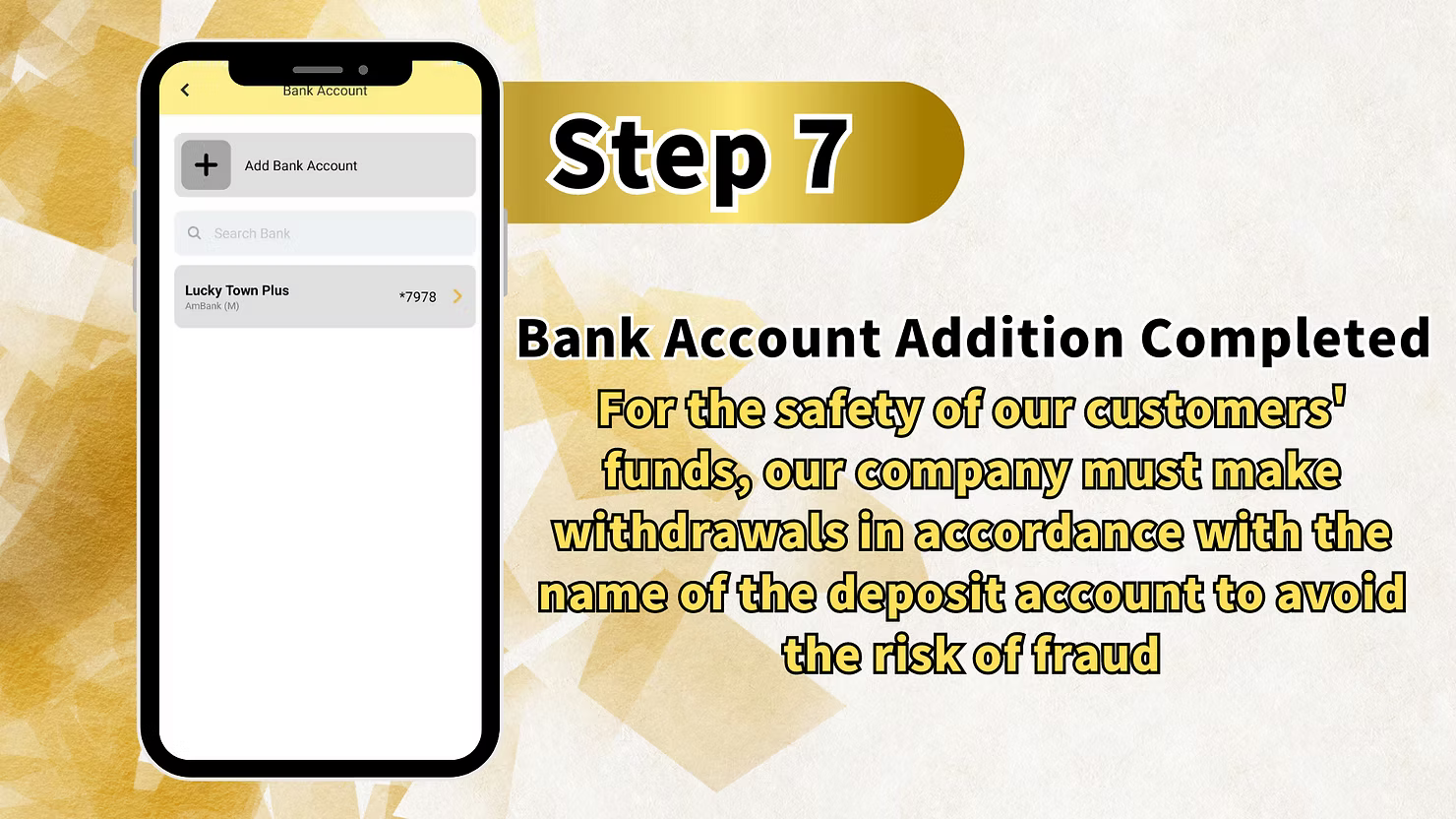
Step 6 - Bank Account Addition Completed
After successful PIN verification, LUCKYTOWN will display "Bank Account Addition Completed". Your bank account is now linked to your LUCKYTOWN profile for withdrawals. For safety, LUCKYTOWN requires withdrawals to follow the name of the deposit account. This means your withdrawal bank account name must match your deposit account name and your registered real name.
LUCKYTOWN Add Bank Account - Important Rules & Requirements
Real Name Matching is Mandatory
LUCKYTOWN strictly enforces real name matching. The bank account holder name must exactly match the real name registered on your LUCKYTOWN account and the name used for previous deposits. Any mismatch can cause withdrawal rejection. This rule is part of the platform's fraud prevention policy.
Personal Withdrawal Account Only
When adding a bank account on LUCKYTOWN, you must choose "Personal Withdrawal Account" as the account type. Business accounts, third-party accounts, or joint accounts with different names are not accepted for withdrawals.
Transaction PIN Required for Verification
Your 6-digit transaction PIN is required to add a bank account. This PIN was created during registration and is separate from your login password. Keep it secure and do not share it. If you forget it, use the "Forgot transaction pin" option and complete the reset flow.
Supported Banks
LUCKYTOWN supports major Malaysian banks including Affin Bank, Alliance Bank Malaysia, AmBank, Bangkok Bank, Bank of America Malaysia, Bank of China Malaysia, Bank of Tokyo-Mitsubishi UFJ, Maybank, Public Bank, CIMB Bank, Hong Leong Bank, and RHB Bank. If your bank does not appear, contact customer support for guidance.
One Account Per Customer (Fraud Prevention)
For security reasons, LUCKYTOWN generally limits withdrawals to the same bank account used for deposits or another verified matching account. Adding multiple bank accounts may trigger additional checks. This policy helps prevent unauthorized withdrawals and money laundering risk.
Why Add a Bank Account on LUCKYTOWN?
Required for Withdrawals
You must add a bank account on LUCKYTOWN before you can withdraw funds. Without a verified bank account linked to your real name, withdrawal requests cannot be processed.
Faster Payouts
Once your bank account is added and verified, LUCKYTOWN withdrawals are usually processed more smoothly. Having your withdrawal account ready early reduces delays when you want to cash out winnings.
Fraud Protection
The real-name matching policy protects both players and the platform. Funds can only be withdrawn to an account in your own name, which helps prevent unauthorized access and fraud.
What Information Do I Need to Add a Bank Account on LUCKYTOWN?
You need your bank name, your account holder name exactly as registered, your bank account number, and your 6-digit LUCKYTOWN transaction PIN.
Why Is My Bank Account Addition Request Rejected?
Common reasons include the account holder name not matching your LUCKYTOWN real name, entering an incorrect transaction PIN, using an invalid account number, or trying to use a business or third-party account. Correct the issue and try again.
Can I Add Multiple Bank Accounts on LUCKYTOWN?
LUCKYTOWN usually expects one main withdrawal account per member as part of fraud prevention. If you need to change banks, you may need to replace the existing account or contact customer support for help.
What Is the Transaction PIN? Where Can I Find It?
The transaction PIN is the 6-digit security code you created when you registered your LUCKYTOWN account. It is different from your login password. If you forget it, use the "Forgot transaction pin" link to reset it.
Do I Need to Add a Bank Account Before Depositing?
No. You can deposit funds before adding a bank account. However, you must add and verify a bank account before your first withdrawal. It is recommended to set it up early so you do not face payout delays later.
What Happens After I Successfully Add a Bank Account?
After your bank account is successfully added, it will appear in your Bank Account list and can be used for future withdrawals. Depending on the page flow, you may also be able to view, update, or remove it from the same menu.
Ready to Withdraw Your Winnings? Add Your Bank Account on LUCKYTOWN Now
Follow the 6-step guide above to add your personal bank account. You will need your real name, bank account number, and 6-digit transaction PIN. New to LUCKYTOWN? Register first, then add your bank account to prepare for smooth withdrawals.
Start Adding Bank Account on LUCKYTOWN