
Top Up at LUCKYTOWN PLUS – Complete Deposit Guide
Why Choose LUCKYTOWN PLUS for Deposits?
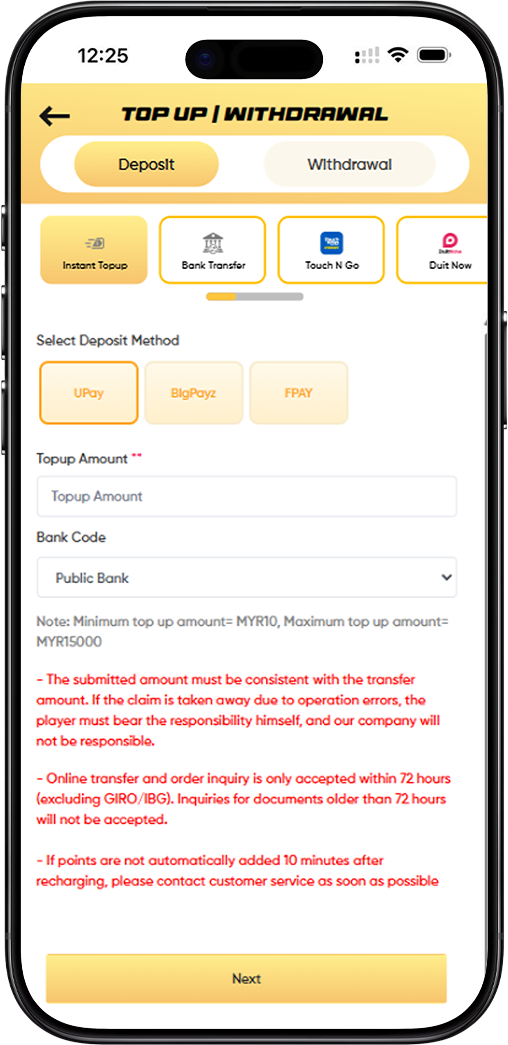
LUCKYTOWN offers multiple deposit methods to suit every player's preference. Whether you prefer instant transfers, bank transfers, e-wallets like Touch N Go, Duit Now, or cryptocurrency with USDT (TRC20), our platform makes depositing funds quick and easy. LUCKYTOWN ensures your transactions are secure and processed promptly so you can start playing without delay.
Step-by-Step Guide to Topping Up on LUCKYTOWN
Step 1: Access the Top Up Page
Log in to your LUCKYTOWN account. From the main menu or your personal dashboard, click on "Top Up" or navigate to the **"TOP UP WITHDRAWAL"** section to access the deposit interface.
Step 2: Select Your Deposit Category
At the top of the deposit page, you will see several main deposit categories. Choose the one that matches your preferred payment method:
Available Deposit Categories
- Instant Topup – For quick deposits via UPay, BigPayz, or FPAY
- Bank Transfer – For direct bank transfers to LUCKYTOWN accounts
- Touch N Go – For deposits using Touch N Go e-wallet
- Duit Now – For Duit Now QR code transfers
- USDT (TRC20) – For cryptocurrency deposits using USDT on TRC20 network
Step 3: Select Your Specific Deposit Method
Within your chosen category, select the specific deposit method. Options vary by category:
Instant Topup / UPay Methods
- UPay – Available for multiple payment types including Touch N Go, Boost, GrabPay, ShopeePay, Maybank QR, and DuitNow
- BigPayz – Alternative instant payment provider
- FPAY – Another instant payment option
Bank Transfer Methods
When you select Bank Transfer, you can choose from various Malaysian banks including:
- Public Bank
- May Bank
- Cimb Bank
- Hong Leong
- RHB Bank
- AmBank
- Bank Simpanan Nasional
- Bank Islam
Touch N Go / E-Wallet Methods
For Touch N Go and related methods, options include:
- Touch 'n Go
- Boost
- GrabPay
- ShopeePay
- Maybank QR
Duit Now
Select Duit Now for QR code-based transfers through the Duit Now system.
USDT (TRC20)
For cryptocurrency deposits, select from:
- BINANCE – Deposit from Binance exchange
- Huobi – Deposit from Huobi exchange
- Others – Other wallets or exchanges
- Additional options for Binance and Huobi may appear
Step 4: Enter Your Top Up Amount
Fill in the "Topup Amount" field with the amount you wish to deposit. Note the minimum and maximum limits for each method:
Deposit Limits by Method
- Instant Topup / UPay / E-Wallets:Minimum RM10, Maximum RM2,500 (some methods up to RM15,000)
- Bank Transfer: Minimum RM20, Maximum RM20,000
- USDT (TRC20): Amount entered in USDT, with estimated MYR amount shown based on current rate (example shows rate 4.12)
Step 5: Review Important Notices
Before proceeding, carefully review all important notices displayed on the screen. These include:
Name Matching Requirement
"If the real name and bank transfer account name submitted for topup are inconsistent, company has right to reject the submitted application." The name on your payment method must match your LUCKYTOWN registered name.
Amount Consistency
"The submitted amount must be consistent with the transfer amount. If the claim is taken away due to operation errors, the player must bear the responsibility himself, and our company will not be responsible." Always transfer the exact amount you entered.
Transfer Reference Format
"Please specify LT- (your user name) on the transfer slip. E.g. ID: lucky town, Refer: LTLuckytown."Including this reference helps match your transfer to your account.
Bank Account Changes
"Our company will change the bank account from time to time, please confirm the account in advance at your bank before transfer of payment. The company is not responsible for any loss caused by your mistake." Always verify you have the current account details.
Fraud Prevention – Prohibited Words
"If the following words are filled in, we will review them more strictly and the user may not be able to top-ups successfully. Example: Sales / Purchases, Rent / Loan, Telecommunication station, Currency exchange, Medical supplies, Clothing supply, Electronic products, Transportation, Car parts, Motor parts, Luxury / Famous brand, Concert tickets / Coupons, Foods / Snacks / Fruits / Drink / Books and others."
QR Code Specific Warnings
For QR code transfers: "QR code transfer and order inquiry is only accepted within 48 hours, and documents older than 48 hours will not be accepted." Also: "If the player saves the QR to recharge or uses the old QR to recharge during the maintenance period, all recharge amounts will not be able to be checked and the player will lose the recharged amount."
USDT Specific Rules
For USDT deposits: "On this platform, USDT top-ups will be based on the first customer who submits the order. Later submissions will be considered invalid. If a transfer is made but the top-up order is not submitted within 30 minutes, it will also be considered invalid. The time will be based on the time shown in the platform's wallet."
Processing Time
"If points are not automatically added 10 minutes after recharging, please contact customer service as soon as possible."
Step 6: Complete Your Deposit
After entering your amount and reviewing all notices, click the "Next" button to proceed. Follow the specific instructions for your chosen method:
For Bank Transfer
You will receive account details to copy. Make the transfer from your banking app, then return to upload your receipt.
For QR Code Methods
A QR code will be displayed. Scan it with your e-wallet app, complete the payment, and the system will process automatically (receipt upload may be required).
For USDT
You will receive a USDT wallet address. Send the exact amount from your exchange or wallet, then submit your TXID for verification.
Detailed Deposit Method Information
Instant Topup via UPay, BigPayz, and FPAY
Instant topup methods offer the fastest way to deposit funds. With UPay, you can access multiple payment options including Touch 'n Go, Boost, GrabPay, ShopeePay, Maybank QR, and DuitNow. Limits range from RM10 to RM2,500 depending on the specific method.
Bank Transfer Deposits
Bank transfers support all major Malaysian banks with higher limits (RM20 to RM20,000). Always include your LT-username reference and ensure the transfer amount matches exactly. Processing typically takes a few minutes after receipt upload.
Touch N Go and E-Wallet Deposits
E-wallet deposits are processed via QR code with limits of RM10 to RM2,500. Important: Do not save or reuse QR codes – always use the current QR displayed. Transfers must be completed within 48 hours for inquiry acceptance.
Duit Now QR Deposits
Duit Now offers another QR-based option with similar limits and rules to Touch N Go deposits. Available through UPay and other providers.
USDT (TRC20) Cryptocurrency Deposits
USDT deposits use the TRC20 network with current conversion rates displayed (example shows 4.12). Important rules: First-come-first-served basis, order must be submitted within 30 minutes of transfer, and timing is based on platform wallet time.
Important Notices and Rules Summary
Key Rules for All Deposit Methods
- Names must match between payment method and LUCKYTOWN account
- Transfer amounts must exactly match submitted amounts
- Include LT-username reference for bank transfers
- Avoid prohibited words in transfer remarks
- Contact customer service if funds not credited within 10 minutes
QR Code Specific Rules
- Inquiries accepted only within 48 hours
- Never save or reuse QR codes
- Using old QR during maintenance may result in lost funds
USDT Specific Rules
- First-come-first-served order submission
- Submit order within 30 minutes of transfer
- Platform wallet time determines validity
Frequently Asked Questions About Top Up
What Is the Minimum Deposit Amount?
Minimum deposit amounts vary by method: RM10 for instant topup, e-wallets, and Duit Now; RM20 for bank transfer. Check individual method details.
What Is the Maximum Deposit Amount?
Maximum limits: RM2,500 for most e-wallet and QR methods, RM15,000 for some instant methods, RM20,000 for bank transfers.
How Long Do Deposits Take?
Most deposits are processed within 10 minutes after receipt upload or QR completion. Contact customer service if you haven't received credit after 10 minutes.
What If I Enter the Wrong Amount?
You must transfer the exact amount you submitted. If you transfer a different amount, the deposit may fail or be delayed. Contact customer service immediately if you make a mistake.
Can I Use Someone Else's Bank Account?
No. The name on your payment method must match your LUCKYTOWN registered name exactly. Using another person's account will result in rejection.
What Happens If I Use Prohibited Words?
Using prohibited words in transfer remarks will trigger stricter review and may cause your top up to fail. Always use neutral language or the required LT-username format.
Why Choose LUCKYTOWN for Deposits?
LUCKYTOWN offers Malaysian players the most comprehensive deposit options with clear instructions, competitive limits, and robust security measures. From traditional bank transfers to modern e-wallets and cryptocurrency, we support the methods you prefer. Our transparent rules, including important fraud prevention guidelines, help protect your funds while ensuring smooth transactions. LUCKYTOWN is committed to providing a secure, convenient deposit experience for all players.
Top Up Your LUCKYTOWN Account Today
Ready to add funds? Choose your preferred deposit method from Instant Topup, Bank Transfer, Touch N Go, Duit Now, or USDT. Follow our step-by-step guide, review the important notices, and complete your deposit in minutes. Log in now to start your top up – or sign up in minutes using your Malaysia phone number if you're not yet a member.
Start Your Top Up Now