
Join LUCKYTOWN PLUS – Begin Your Journey with a Secure Account
Why LUCKYTOWN PLUS Stands Out for Malaysian Members
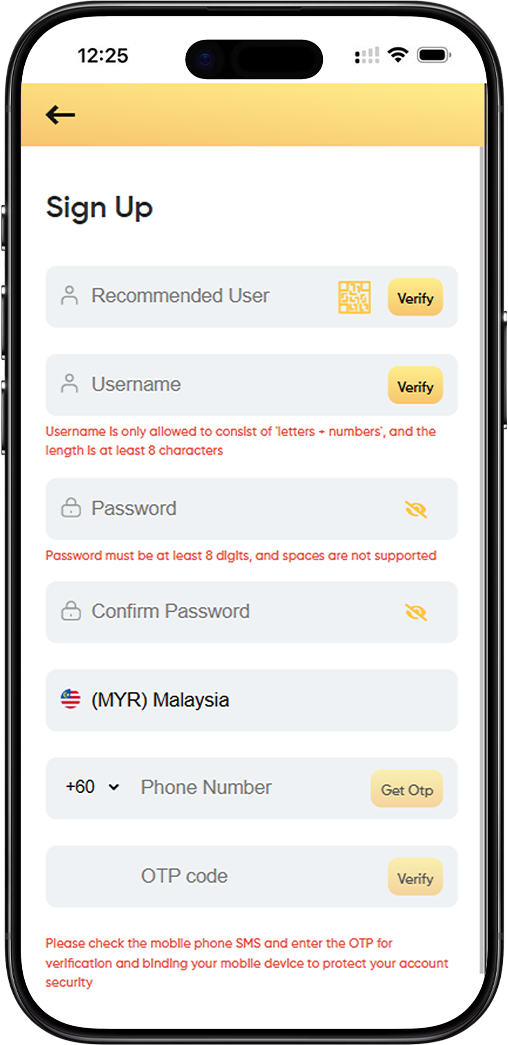
Creating a LUCKYTOWN account is quick when you prepare the right details first. This guide covers the exact username format, password rules, and OTP phone binding flow shown on the register form so you can complete sign up without guesswork.
How to Register Your LUCKYTOWN Account - Step-by-Step Guide
Step 1: Start with your username
Your username must begin with a letter, stay within 6 to 15 characters, and avoid symbols or spaces. Pick something easy to remember because this becomes your main login identity.
Step 2: Create a secure password
Enter a password with at least 6 digits or characters, then repeat it in the confirmation field exactly the same way. This second entry helps you catch typos before the account is created.
Step 3: Bind your mobile number
Select the correct country code, enter your active phone number, and request the OTP. Use a number you can access immediately because the system sends the verification code there.
Step 4: Complete OTP verification
When the one-time password arrives, enter it in the OTP field and confirm the code. If the code does not arrive quickly, recheck your number and network signal before requesting another one.
Step 5: Review and submit
Double-check your username, password confirmation, and verified phone binding before you tap the final register button. A clean review helps you avoid locked accounts and repeat registration attempts.
Step 6: Log in with the new account
After successful submission, use your newly created username and password to sign in. Keep those details stored safely so you can return without recovery delays later.
Step 7: Contact support if verification stalls
If the form rejects a valid username or OTP verification keeps failing, capture the issue and contact customer care with the phone number and time of the attempt for faster help.
Why Join LUCKYTOWN and Verify Your Phone Number
Fast access to the platform
A completed registration gives you direct access to the LUCKYTOWN member area, game entry points, promotions, and account tools without waiting for manual approval.
Better account protection
Phone binding adds a second proof of ownership to your account. That matters when you need login support, password recovery, or confirmation that the account belongs to you.
Fewer registration mistakes
Following the username, password, and OTP rules in order keeps the form clean on the first pass. That reduces repeated submissions and helps you get started faster.
Frequently Asked Questions About LUCKYTOWN Registration
What if my username is rejected?
Try a new username that still starts with a letter and stays within the 6 to 15 character limit. Avoid punctuation, spaces, and names that look too similar to existing accounts.
What if the OTP does not arrive?
Wait briefly, confirm that your number is correct, and request a fresh code only after checking your mobile signal. Repeated wrong entries can delay the process further.
Can I register without phone verification?
No. The workbook flow makes phone binding part of the register process, so the account setup should be treated as incomplete until the OTP step succeeds.
Register Now - It's Free

Use the QR code for a faster mobile signup flow, or tap the button below to open the register form directly. Once your account is active, you can continue to login and access the rest of the LUCKYTOWN platform.
Create Your LUCKYTOWN Account Now