
Real Name Verification at LUCKYTOWN PLUS - Complete Guide
Why Real Name Verification Is Important at LUCKYTOWN PLUS


Step 1 - Click "ME" on the Bottom Right Corner of the Main Page
To begin your LUCKYTOWN real-name verification, first log in to your account. On the main page (dashboard), look at the bottom right corner and click the "ME" icon. This will open your personal account menu where you can access Cash, Chip, Games, Info, Announcement, Top Up, Withdraw, and various game provider shortcuts (4D LOTTERY, PRAGMATIC, ADVANT PLAY, JOKER, JILI, LUCKY365, BIG GAMING, IBCBET, SPORTS, PLAY TECH, WS GAMING, MEGA888, WON CASINO, SBOBET).
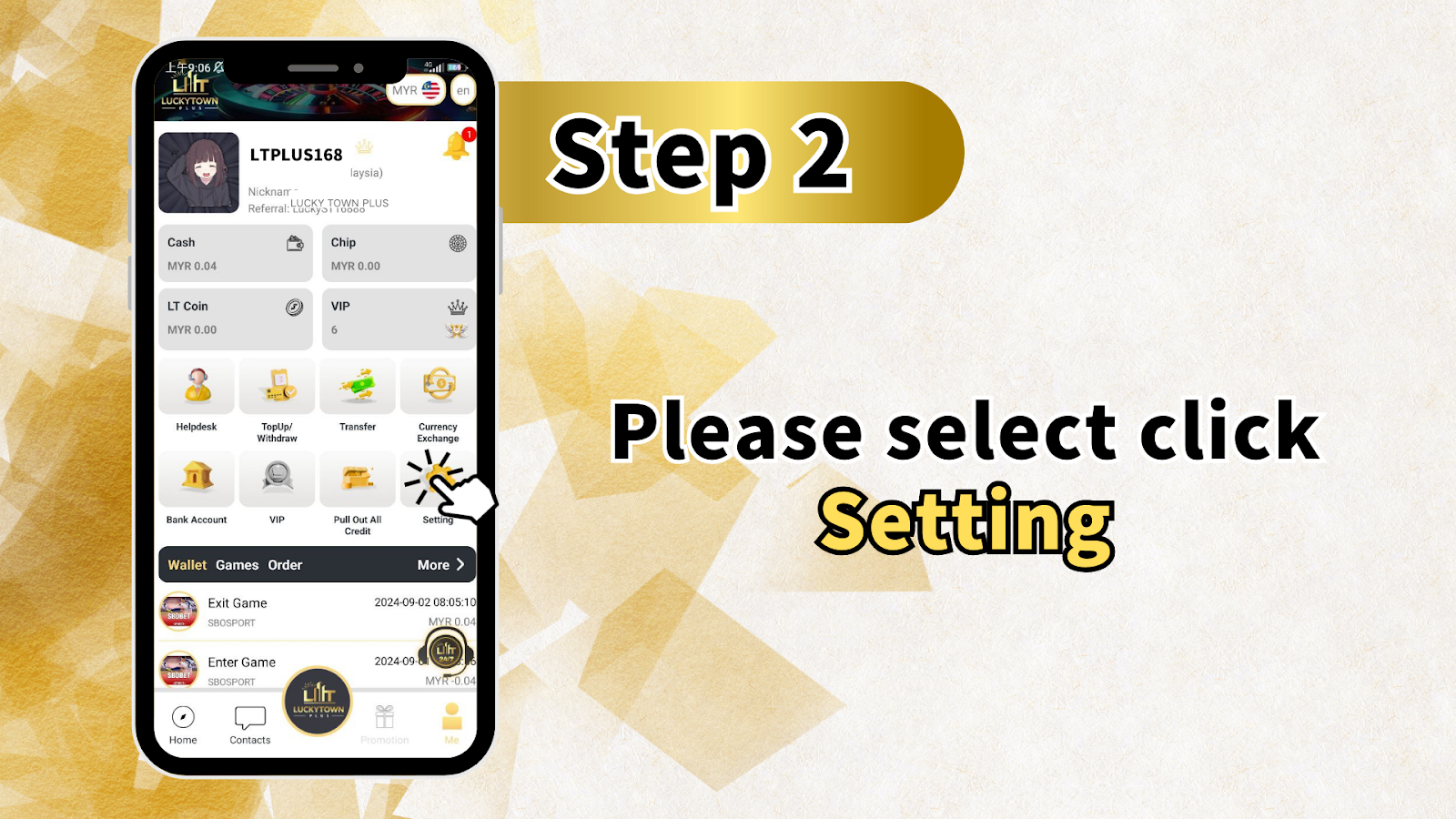
Step 2 - Select and Click "Setting"
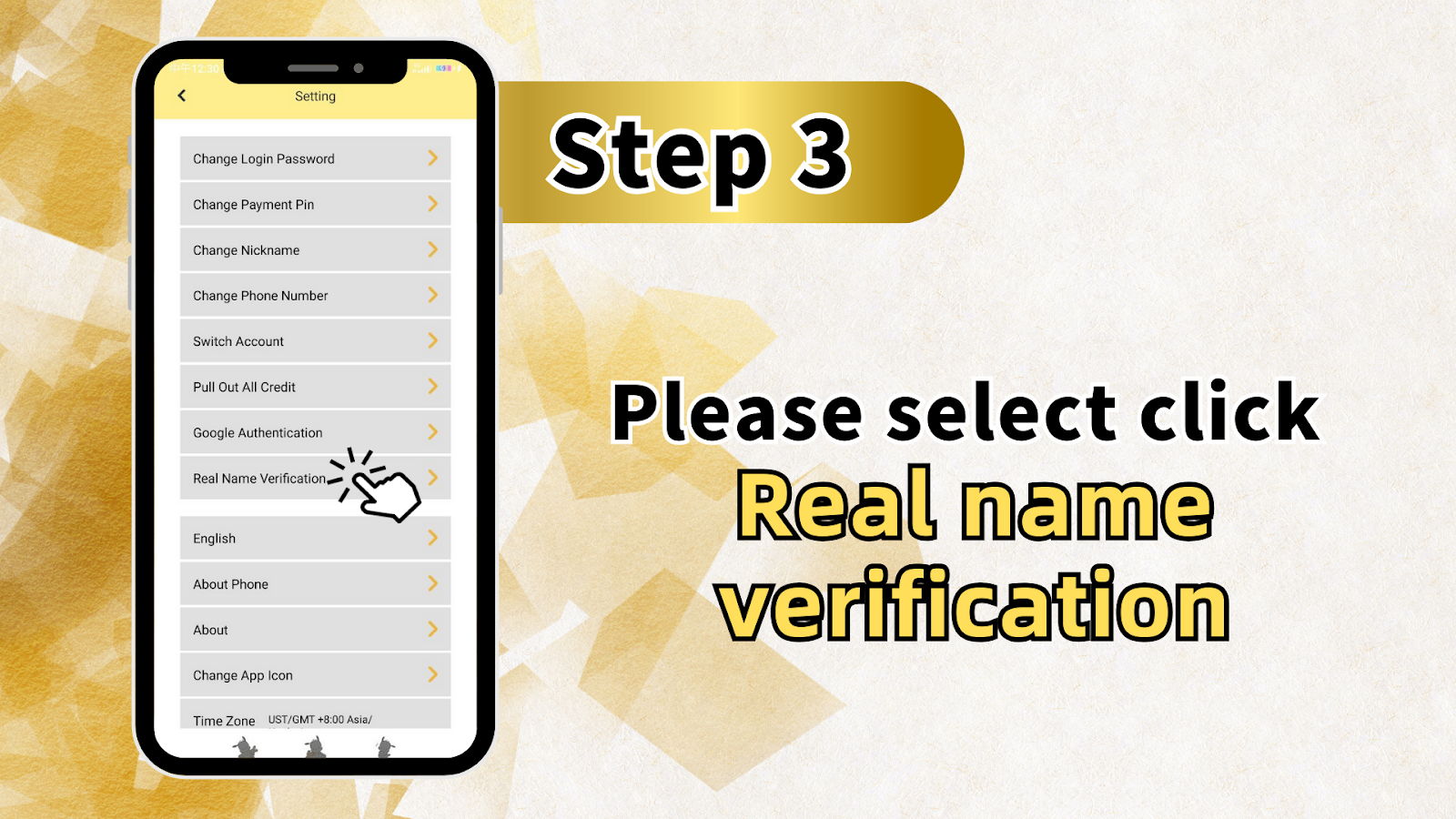
After entering the "ME" section, you will see multiple account options. Look for and click "Setting" (typically represented by a gear icon). The Setting menu contains important account management tools including: Change Login Password, Change Payment Pin, Change Nickname, Change Phone Number, Switch Account, Pull Out All Credit, Google Authentication, Real Name Verification, English language selection, About Phone, About, and Time Zone (US/TGMT +8:00 Asia/).
Step 3 - Add a Bank Account with Your Real Name
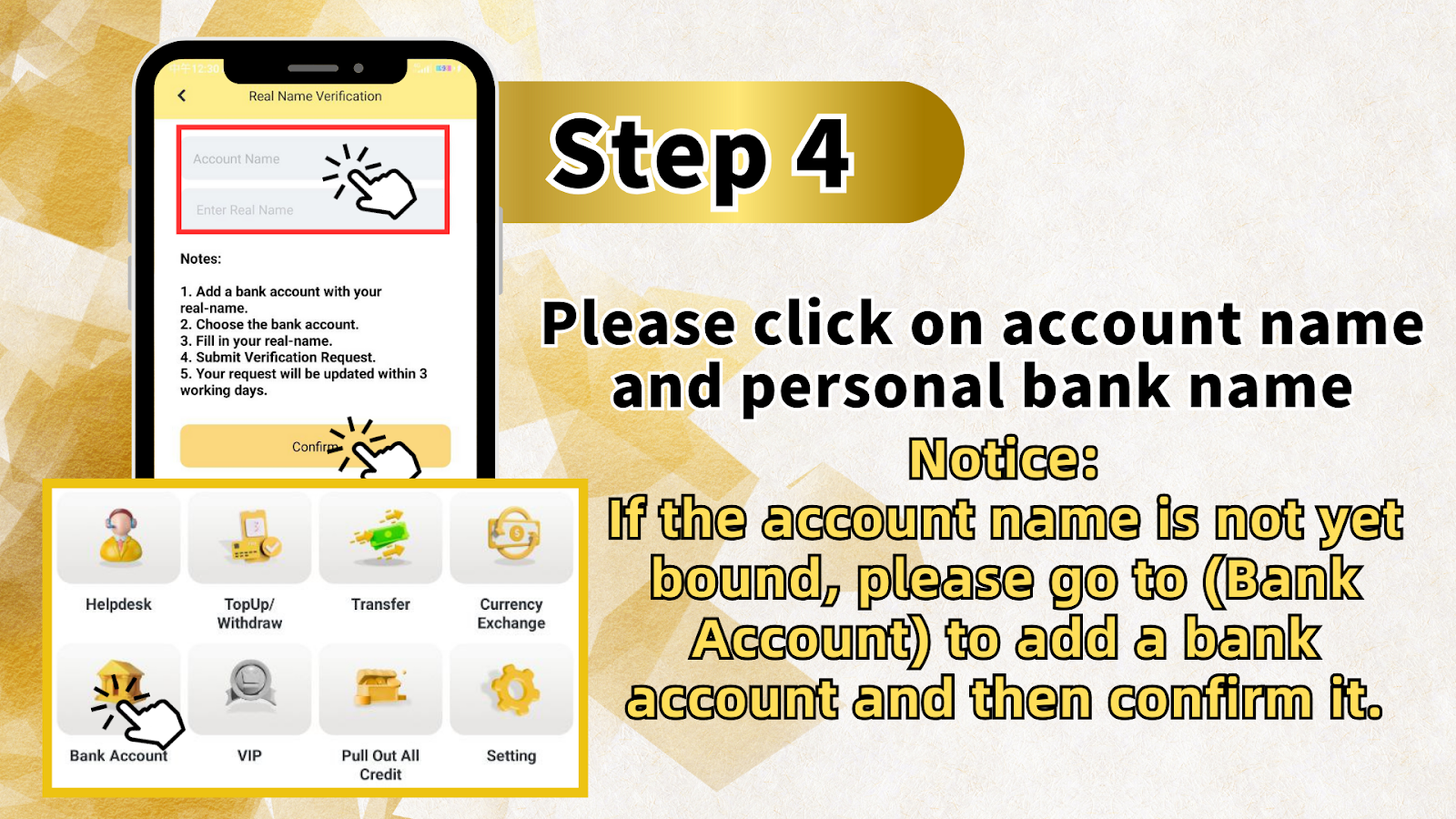
Before submitting your LUCKYTOWN real-name verification, you must first add a bank account with your real name. If your account name is not yet bound, go to "Bank Account" (found in the same menu area as Helpdesk, TopUp/Withdraw, Transfer, Currency Exchange, VIP, Pull Out All Credit, and Setting). Add your bank account details ensuring the account holder name matches your legal real name exactly.
Step 4 - Fill in Your Real Name and Submit Verification Request
Once your bank account is added, return to the Real Name Verification section. Follow these sub-steps: 1) Choose the bank account you just added. 2) Fill in your real name (must match your bank account and government ID exactly - no nicknames or abbreviations). 3) Submit the verification request by clicking the confirmation button.
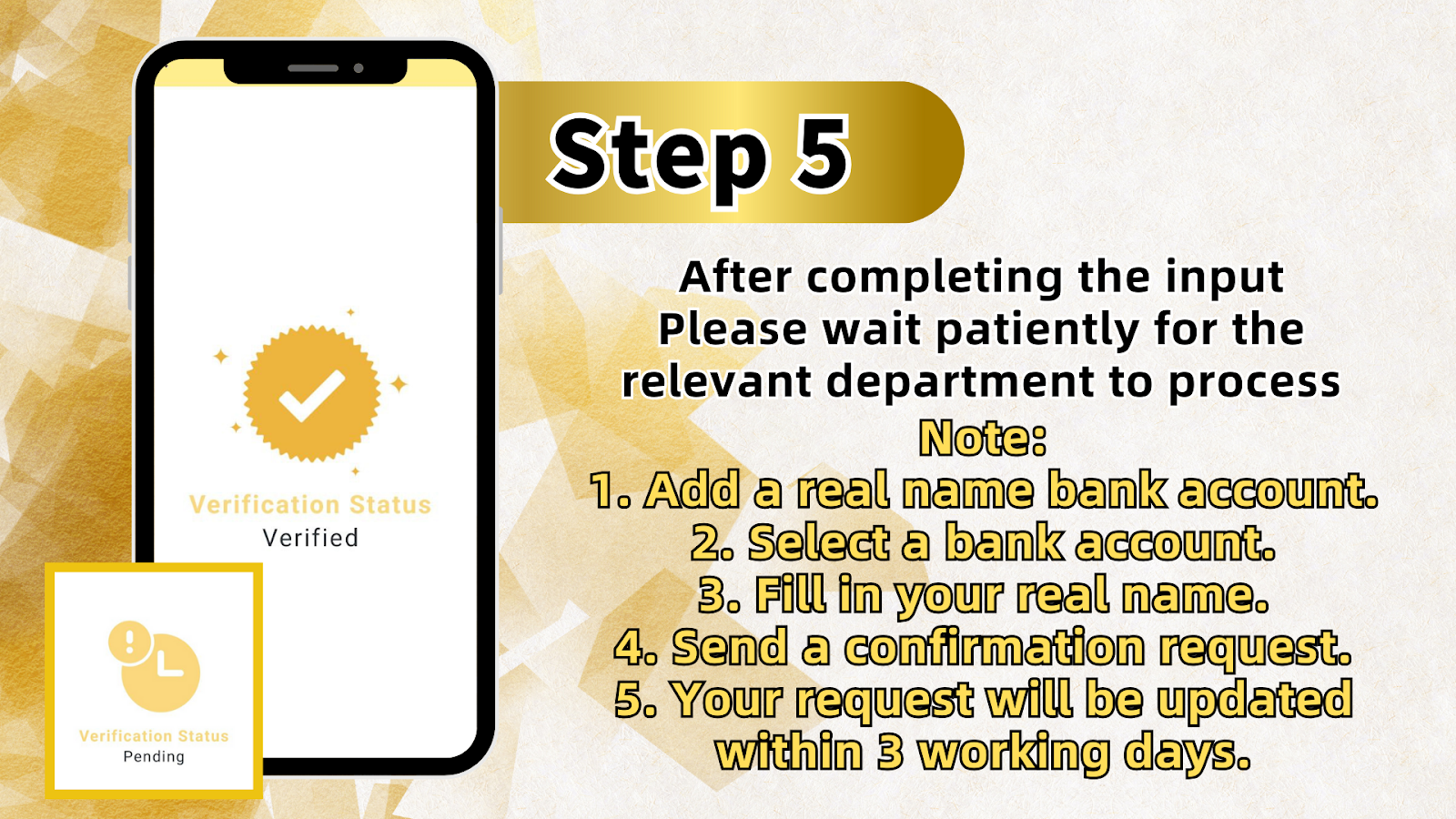
Step 5 - Wait for Processing (Within 3 Working Days)
After completing your LUCKYTOWN real-name verification submission, please wait patiently for the relevant department to process your request. Your verification request will be updated within 3 working days. You will receive a notification once your real-name verification is approved. If there are any issues, LUCKYTOWN customer support will contact you.
LUCKYTOWN Real-name Verification - Important Notes
Note 1 - Add a Real Name Bank Account First
LUCKYTOWN requires that you add a bank account with your real name before submitting real-name verification. The bank account holder name must exactly match the real name you provide in the verification form. This ensures smooth withdrawals and prevents payment delays.
Note 2 - Select the Correct Bank Account
If you have multiple bank accounts added to your LUCKYTOWN account, make sure you select the correct bank account that matches the real name you are verifying. The system will link your real-name verification to this specific bank account for future withdrawals.
Note 3 - Fill in Your Real Name Exactly as on ID
Your real name must be filled in exactly as it appears on your government-issued ID (e.g., MyKad for Malaysia, passport for international players). Do not use nicknames, shortened names, or alternative spellings. Any mismatch will cause verification delays or rejection.
Note 4 - Submit Verification Request
After filling in all required information, click the submit button to send your verification request to LUCKYTOWN. Double-check all details before submitting - corrections cannot be made once submitted until the request is processed or rejected.
Note 5 - Processing Time: Within 3 Working Days
LUCKYTOWN's verification team typically processes real-name verification requests within 3 working days. Weekends and public holidays may extend processing time. You will receive an in-app notification or email once your verification status is updated.
Why Complete LUCKYTOWN Real-name Verification?
Enable Faster Withdrawals
LUCKYTOWN real-name verification is required for smooth and fast withdrawals. Unverified accounts may face withdrawal delays or lower daily limits. Verified accounts enjoy priority processing and higher transaction limits.
Enhance Account Security
Real-name verification adds an extra layer of security to your LUCKYTOWN account. It proves that you are the legitimate owner of the account and linked bank account, preventing unauthorized access and fraudulent withdrawal attempts.
Comply with KYC Regulations
LUCKYTOWN follows industry-standard Know Your Customer (KYC) practices. Real-name verification ensures compliance with regulatory requirements and protects both the platform and players from money laundering and other illegal activities.
Where Do I Find the LUCKYTOWN Real-name Verification Option?
Click the "ME" icon on the bottom right corner of the LUCKYTOWN main page, then select "Setting". In the Setting menu, look for "Real Name Verification" - this is where you begin the process.
Do I Need to Add a Bank Account Before LUCKYTOWN Real-name Verification?
Yes. According to the LUCKYTOWN teaching guide, you must add a bank account with your real name before submitting real-name verification. If the account name is not yet bound, go to Bank Account first to add your bank account, then confirm it.
How Long Does LUCKYTOWN Real-name Verification Take?
Your LUCKYTOWN real-name verification request will be updated within 3 working days after submission. The verification team processes requests in order. You will be notified once your verification is approved or if additional information is needed.
What Happens If My LUCKYTOWN Real-name Verification is Rejected?
If your verification is rejected, LUCKYTOWN will typically provide a reason (e.g., name mismatch, unclear document, bank account not matching). You can then correct the issue and resubmit. Contact LUCKYTOWN customer support for specific guidance on your rejection.
Can I Withdraw Without Completing LUCKYTOWN Real-name Verification?
Withdrawal options may be limited or unavailable for unverified LUCKYTOWN accounts. To ensure smooth and fast payouts, complete your real-name verification as soon as possible after registering. Verified accounts also enjoy higher withdrawal limits.
Is LUCKYTOWN Real-name Verification Required for Deposits?
No. You can deposit funds into your LUCKYTOWN account without real-name verification. However, withdrawals typically require completed verification to ensure funds are sent to the correct legitimate account owner.
Complete Your LUCKYTOWN Real-name Verification Today
Follow the 5-step guide above to verify your real name and bank account on LUCKYTOWN. Verification takes just a few minutes to submit and processes within 3 working days. New to LUCKYTOWN? Register now, then complete verification for faster withdrawals.
Start LUCKYTOWN Real-name Verification