
USDT Top Up at LUCKYTOWN PLUS - Your Crypto Gateway
How to Perform LUCKYTOWN USDT Topup - Step-by-Step

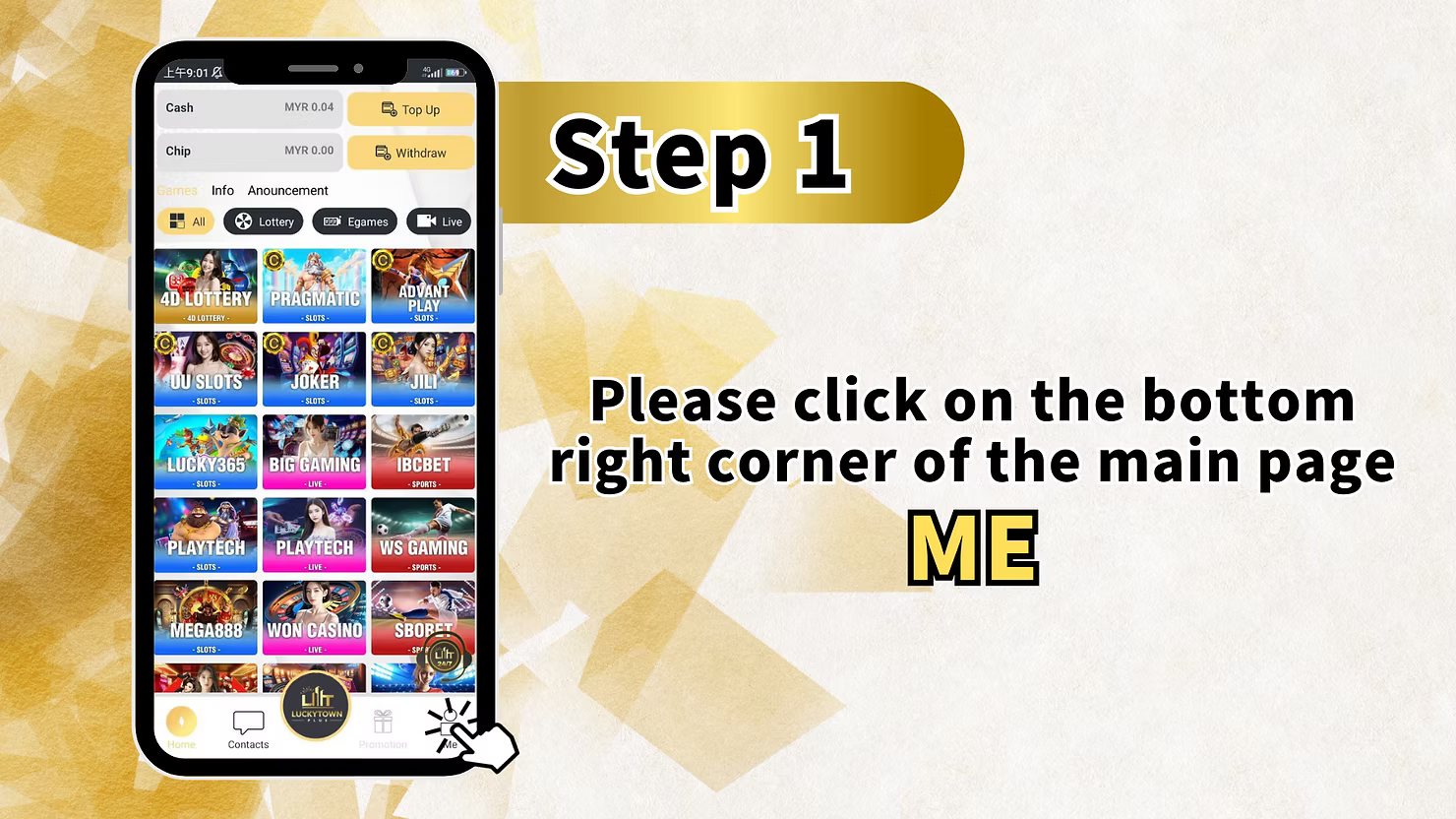
Step 1 - Click "ME" on the Bottom Right Corner of the Main Page
To start your LUCKYTOWN USDT topup, first log in to your account. On the main page dashboard, look at the bottom right corner and click the "ME" icon. This opens your personal account menu where you can access Cash, Chip, Games, Info, Announcement, Top Up, Withdraw, and other account shortcuts.
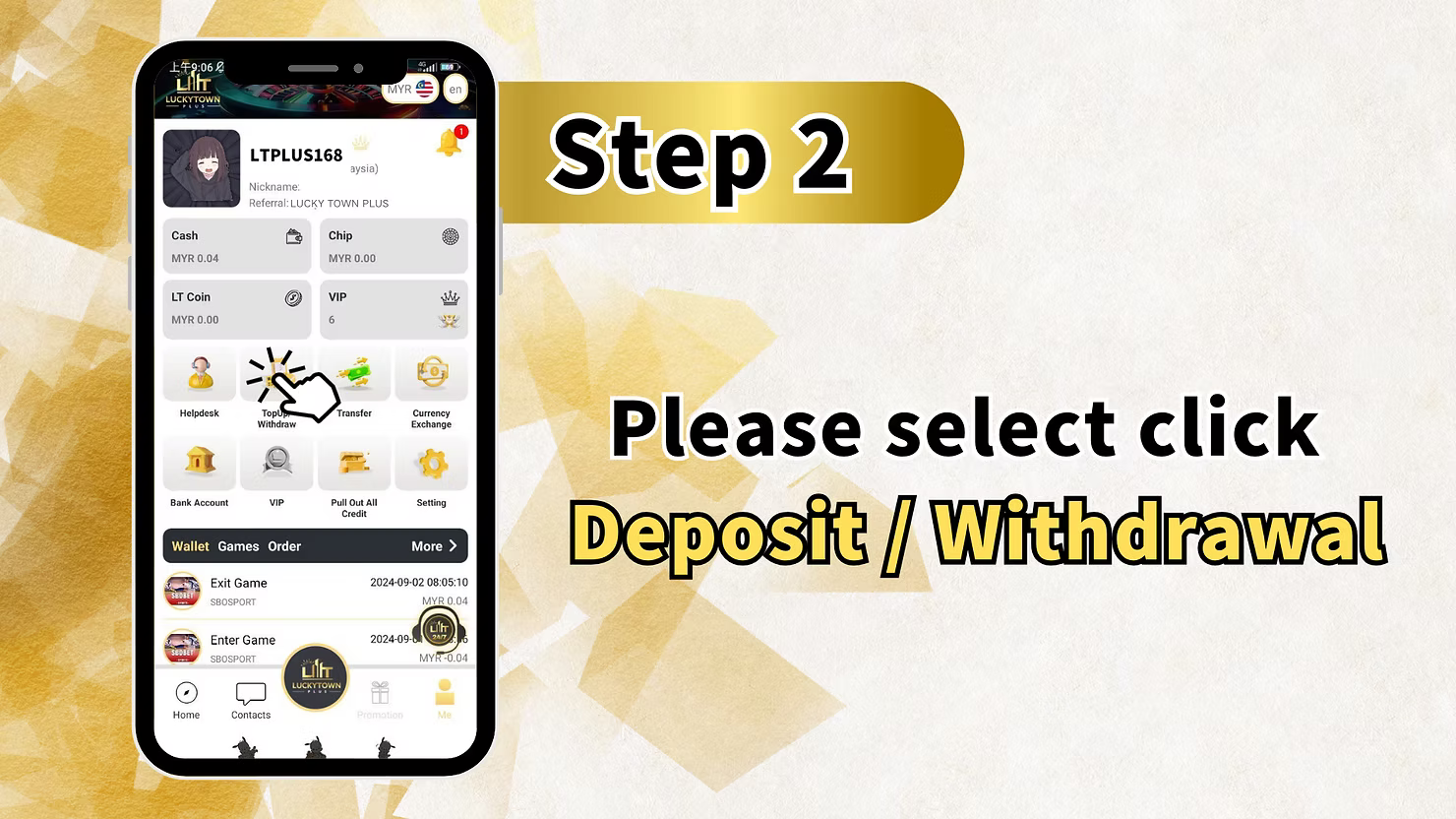
Step 2 - Select "Deposit / Withdrawal" (Top Up/Withdraw)
After entering the "ME" section, click on "Deposit / Withdrawal", which may also appear as Top Up/Withdraw. This takes you to the banking page where you can manage deposits, withdrawals, and transaction history.
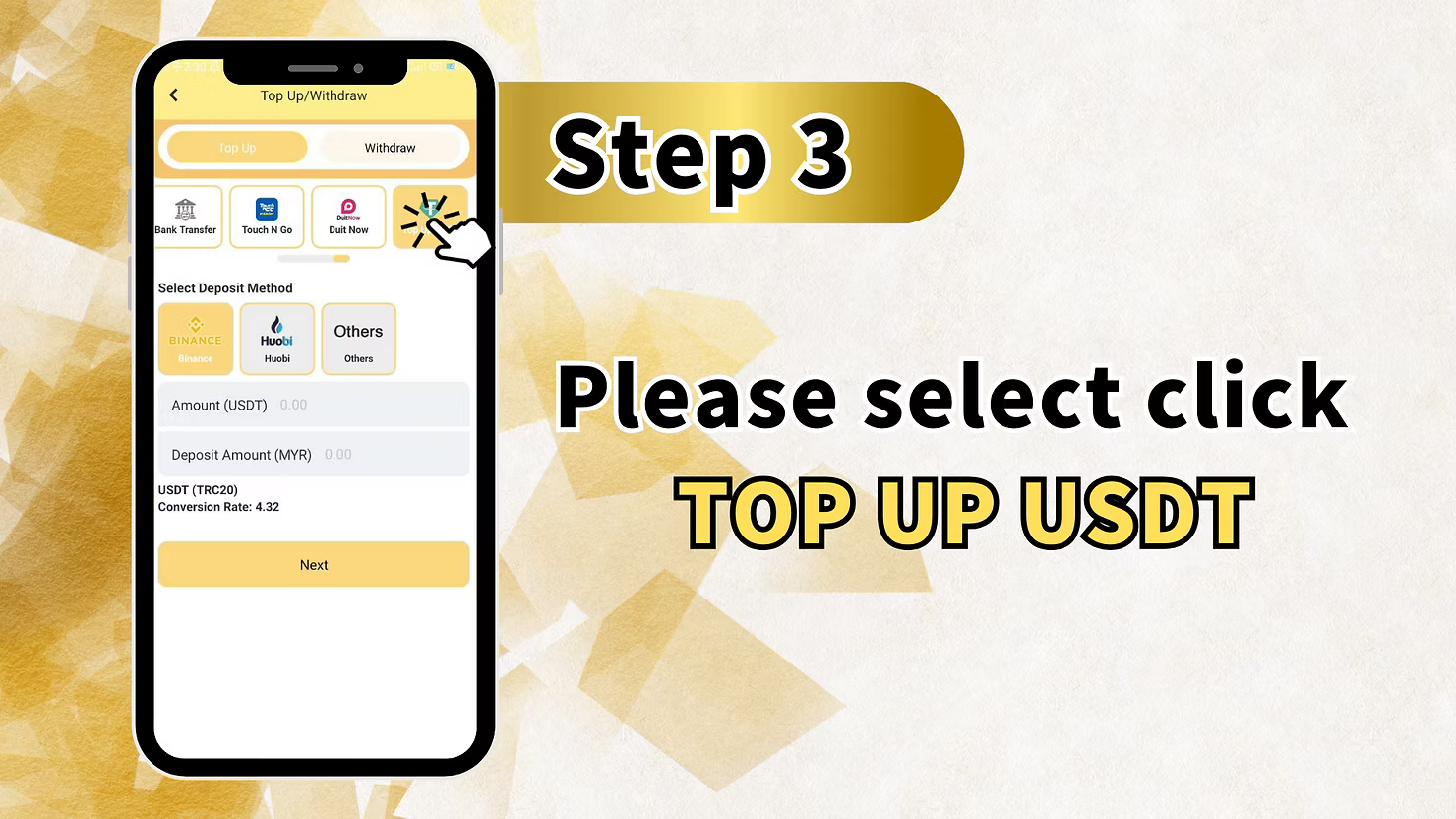
Step 3 - Select USDT as Your Deposit Method
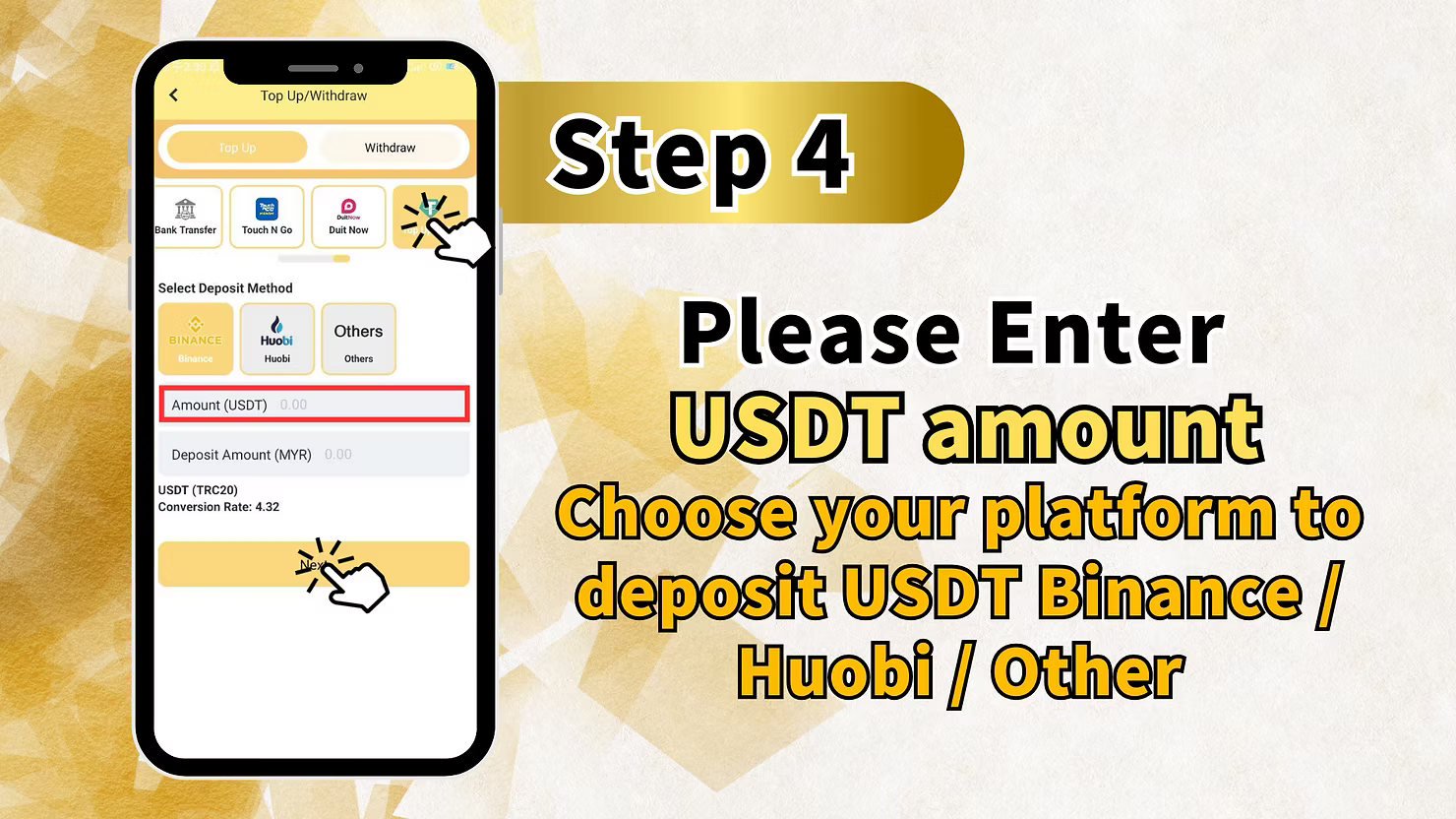
On the Top Up/Withdraw page, you will see several deposit methods including Bank Transfer, Touch N Go, and DuitNow. Scroll until you find the USDT or cryptocurrency deposit section. Select your preferred platform: Binance, Huobi, or Others. The system will show the current USDT to MYR conversion rate such as 4.32. The supported network is TRC20. Enter the amount of USDT you want to deposit and the system will automatically calculate the MYR amount. Click "Next" to continue.
Step 4 - Enter USDT Amount and Select Your Platform
In the USDT amount field, enter how many USDT you want to deposit into your LUCKYTOWN account. Then choose your platform: Binance, Huobi, or Other, such as Trust Wallet, Bybit, OKX, or any wallet that supports TRC20 USDT. Double-check the displayed conversion rate before proceeding. Click "Next" to generate the deposit address.
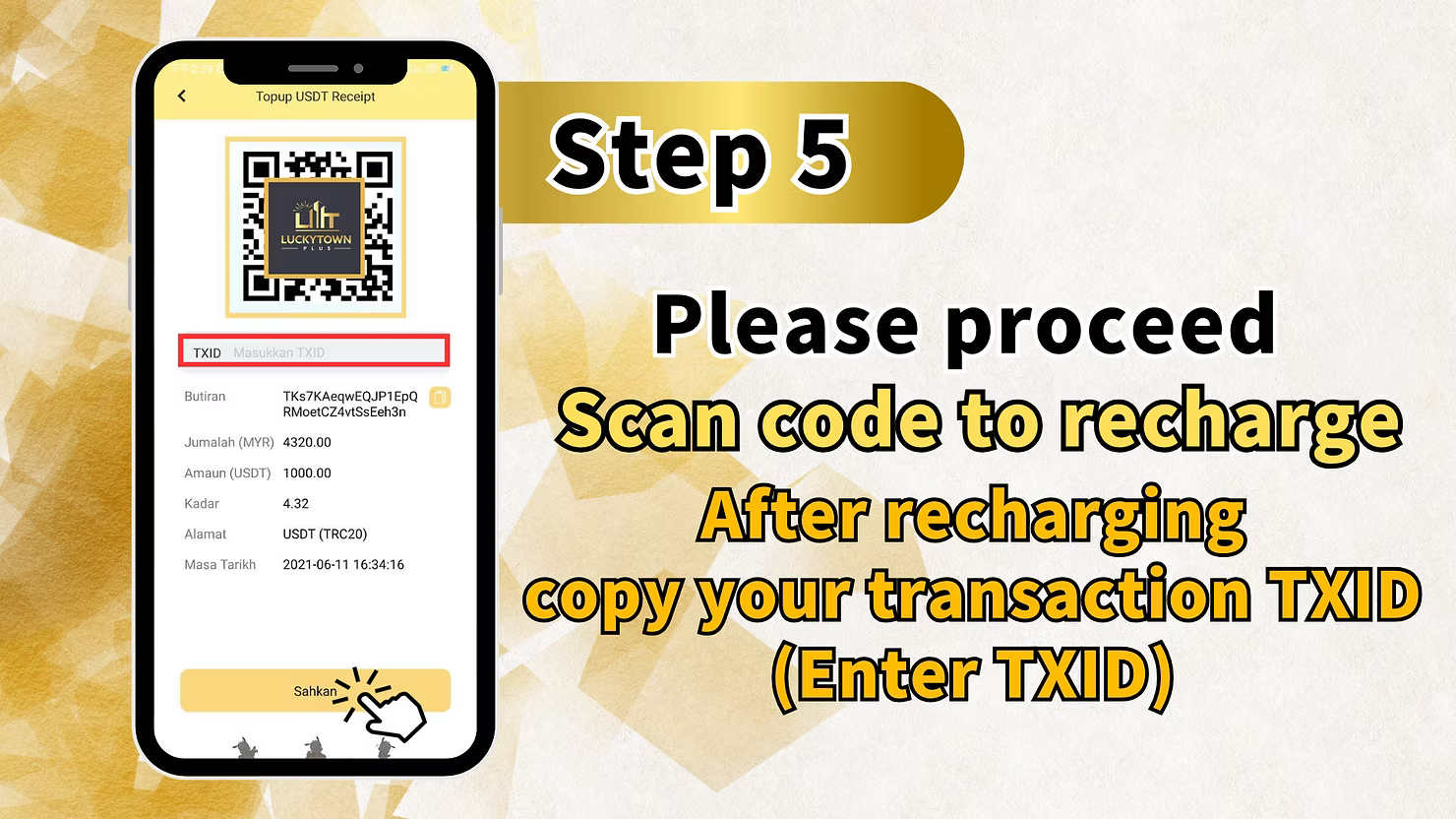
Step 5 - Scan QR Code or Copy Address, Send USDT, and Enter TXID
LUCKYTOWN will display a USDT TRC20 deposit address and a QR code. Scan the QR code using your Binance, Huobi, or wallet app, or copy the address manually. Send the exact amount of USDT you entered to this address using the TRC20 network only. After sending, copy your TXID or Transaction ID from your exchange or wallet. Return to the LUCKYTOWN deposit page, paste the TXID into the "Masukkan TXID" field, then review the amount in MYR, amount in USDT, exchange rate, wallet address, and date or time. Click "Sahkan" to submit the deposit request.
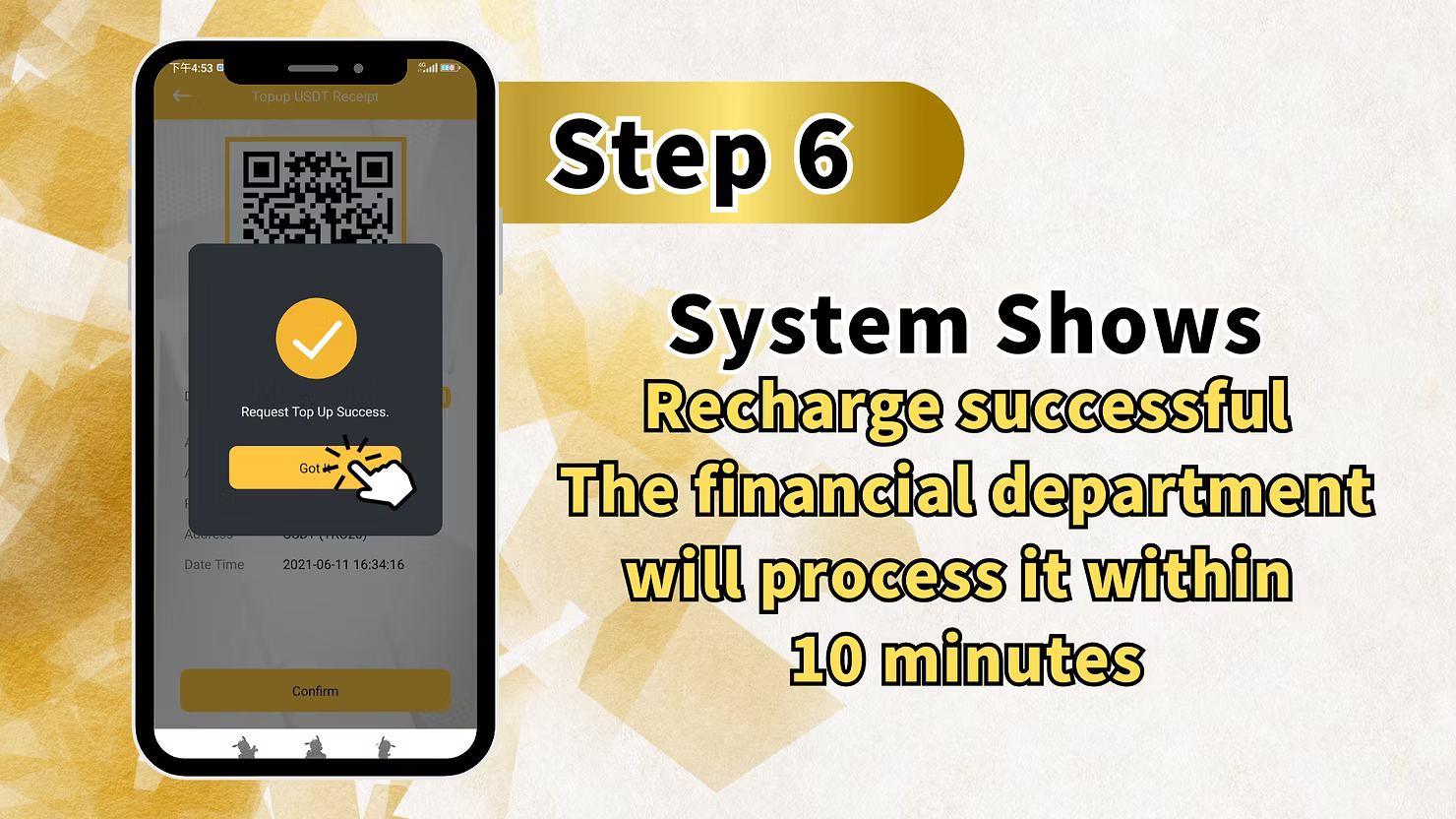
Step 6 - Wait for Processing (Within 10 Minutes)
After submitting, the system will show a message such as "Request Top Up Success" or "Recharge successful". The finance department will process your USDT topup within 10 minutes. Once confirmed, the deposited USDT will be converted to MYR at the confirmed rate and credited to your LUCKYTOWN balance.
LUCKYTOWN USDT Topup - Important Rules & Details
Supported Platforms: Binance, Huobi, Others
LUCKYTOWN accepts USDT deposits from Binance, Huobi, and any other wallet or exchange that supports TRC20 USDT transfers. This includes wallets and exchanges such as Trust Wallet, Bybit, OKX, KuCoin, and others. If your platform is not Binance or Huobi, choose "Others".
Network: TRC20 Only (Tron Network)
LUCKYTOWN USDT topup only accepts the TRC20 network on Tron. Do not send USDT through ERC20, BEP20, or any other network. Sending through the wrong network can permanently destroy access to the funds. Always confirm that your wallet or exchange is set to TRC20 before sending.
Real-Time Conversion Rate
LUCKYTOWN shows the current USDT to MYR conversion rate on the deposit page. The example rate is 4.32. The rate is fixed at the time of your deposit request. The MYR amount credited is calculated as your USDT amount multiplied by the confirmed conversion rate.
TXID (Transaction ID) Required
After sending USDT from your wallet or exchange, you must copy the TXID and paste it into the LUCKYTOWN deposit form. This allows LUCKYTOWN to verify the blockchain transfer. Without a TXID, your deposit cannot be processed properly.
Processing Time: Within 10 Minutes
After you submit your TXID, the LUCKYTOWN finance department typically processes USDT topups within 10 minutes. Because TRC20 confirms quickly, most deposits are credited fast. During peak periods, processing may take up to 30 minutes.
Why Use LUCKYTOWN USDT Topup?
Fast and Low Cost
TRC20 USDT transfers are usually confirmed within one to two minutes and normally carry very low fees. This makes them faster and cheaper than many international bank transfers.
No Bank Involvement
USDT deposits do not require a bank account or e-wallet. If you already hold cryptocurrency from Binance, mining, P2P trading, or another source, you can deposit directly into LUCKYTOWN without using a bank intermediary.
High Limits
USDT topups usually support higher transaction limits than standard bank transfers. The practical limit depends more on your exchange or wallet than on the LUCKYTOWN page itself, which makes larger deposits easier to process.
What Is the Minimum USDT Topup Amount on LUCKYTOWN?
The workbook example shows a deposit of 1,000 USDT, but the live minimum may vary. Check the USDT deposit page on LUCKYTOWN before sending. Smaller deposits may be accepted, but you should verify the current minimum first.
Which Network Should I Use for LUCKYTOWN USDT Topup?
You must use TRC20 only. Do not use ERC20, BEP20, or any other network. Sending through the wrong network may result in permanent loss of funds and LUCKYTOWN will not be able to recover them.
What Is a TXID and Why Is It Required?
A TXID is the unique blockchain transaction ID for your USDT transfer. LUCKYTOWN needs this TXID to locate and verify the transfer after you send it. You can usually find it in the transaction history section of your wallet or exchange.
How Long Does LUCKYTOWN Take to Credit USDT Topups?
After you submit the TXID, LUCKYTOWN normally processes the deposit within 10 minutes. Once the transaction receives confirmation on TRC20, your account should be credited. If it is still not credited after 30 minutes, contact customer support.
Can I Use Other Cryptocurrencies Besides USDT?
This guide is specifically for USDT topup. Other cryptocurrencies such as BTC, ETH, or BNB are not covered here for direct deposit. Convert them to TRC20 USDT first if you want to use this topup flow.
What Happens If I Send the Wrong Amount of USDT?
You should send the exact amount of USDT that you entered in the deposit form. Sending more or less can cause delays or rejection during verification. If you make a mistake, contact LUCKYTOWN customer service immediately and provide your TXID.
Ready to Fund Your LUCKYTOWN Account with USDT? Start Crypto Topup Now
Deposit USDT through Binance, Huobi, or any TRC20 wallet. Enjoy low fees, fast processing within 10 minutes, and support for larger transactions. New to LUCKYTOWN? Register first. Existing members can log in and choose USDT as their deposit method today.
Start LUCKYTOWN USDT Topup