
Bank Transfer Top Up at LUCKYTOWN PLUS - Complete Guide
Why Choose Bank Transfer for Top Up at LUCKYTOWN PLUS?

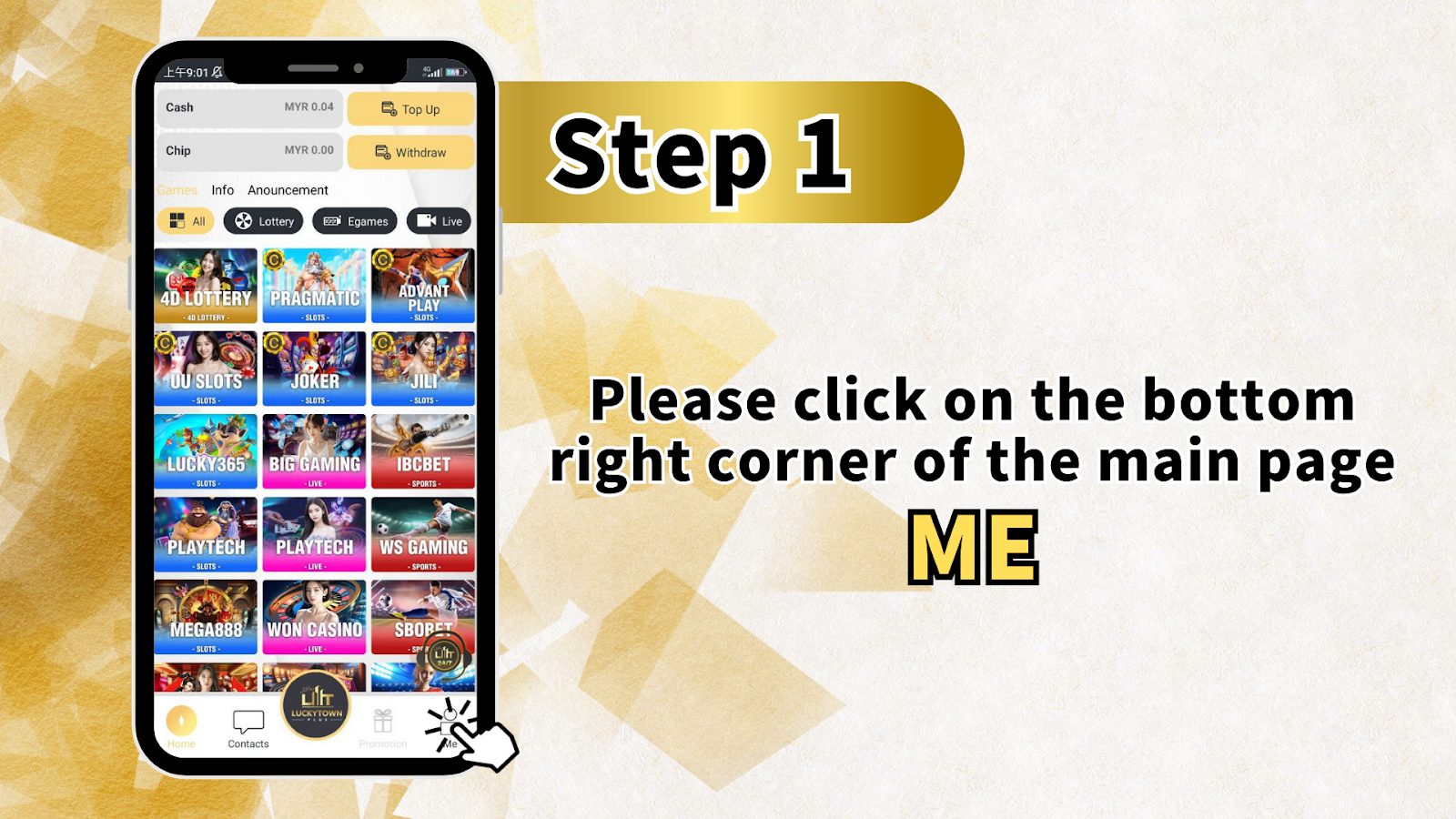
Step 1 - Click "ME" on the Bottom Right Corner of the Main Page
To start your LUCKYTOWN bank transfer topup, first log in to your account. On the main page (dashboard), look at the bottom right corner and click the "ME" icon. This opens your personal account menu where you can access Cash, Chip, Games, Info, Announcement, Top Up, Withdraw, and various game provider shortcuts (4D LOTTERY, PRAGMATIC, ADVANT PLAY, JOKER, JILI, LUCKY365, BIG GAMING, IBCBET, SPORTS, PLAY TECH, WS GAMING, MEGA888, WON CASINO, SBOBET).
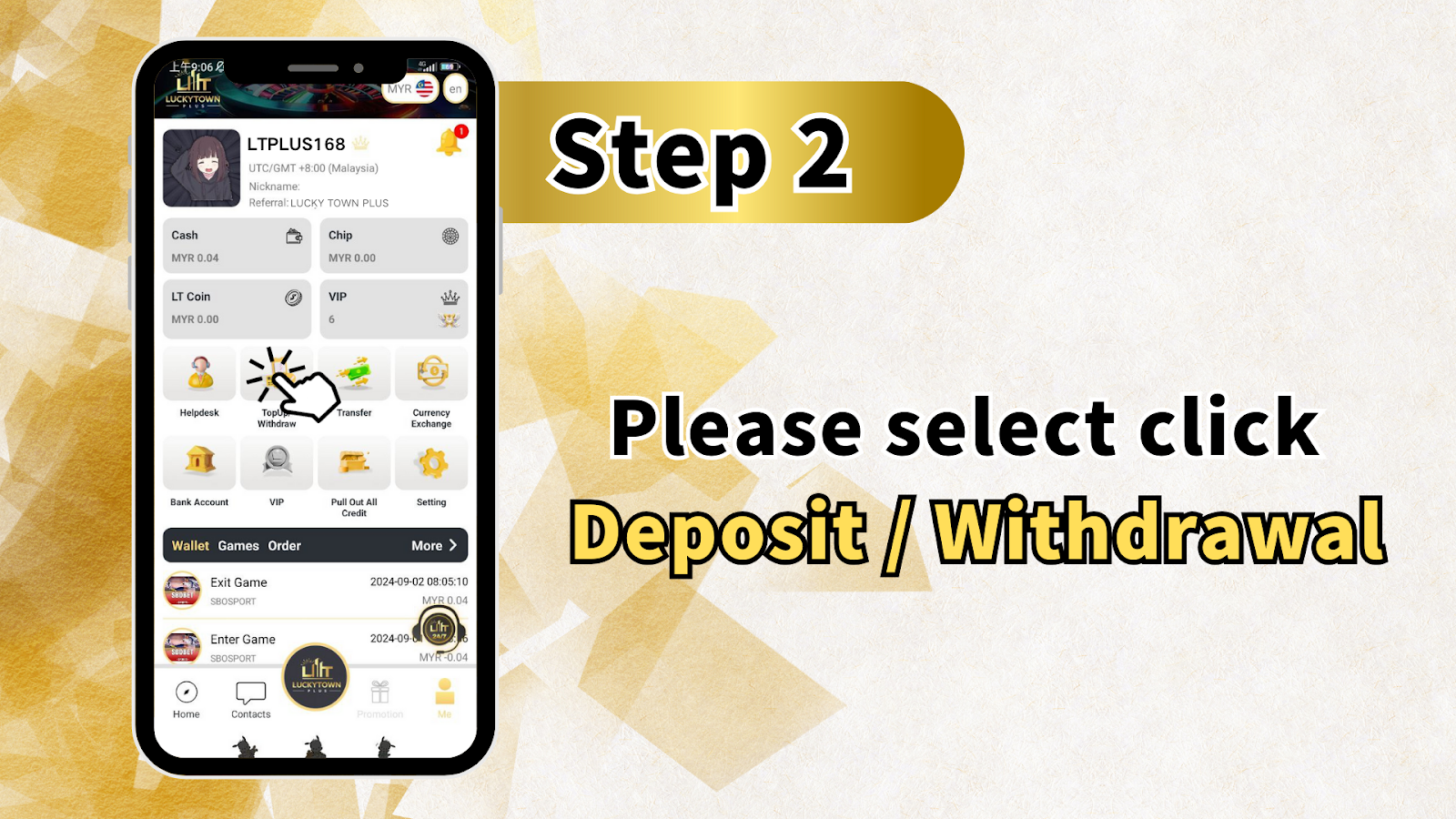
Step 2 - Select "Deposit / Withdrawal" (Top Up/Withdraw)
After entering the "ME" section, click on "Deposit / Withdrawal" (also labeled as Top Up/Withdraw). This will take you to the banking page where you can manage all your fund transactions including deposits, withdrawals, and viewing transaction history.
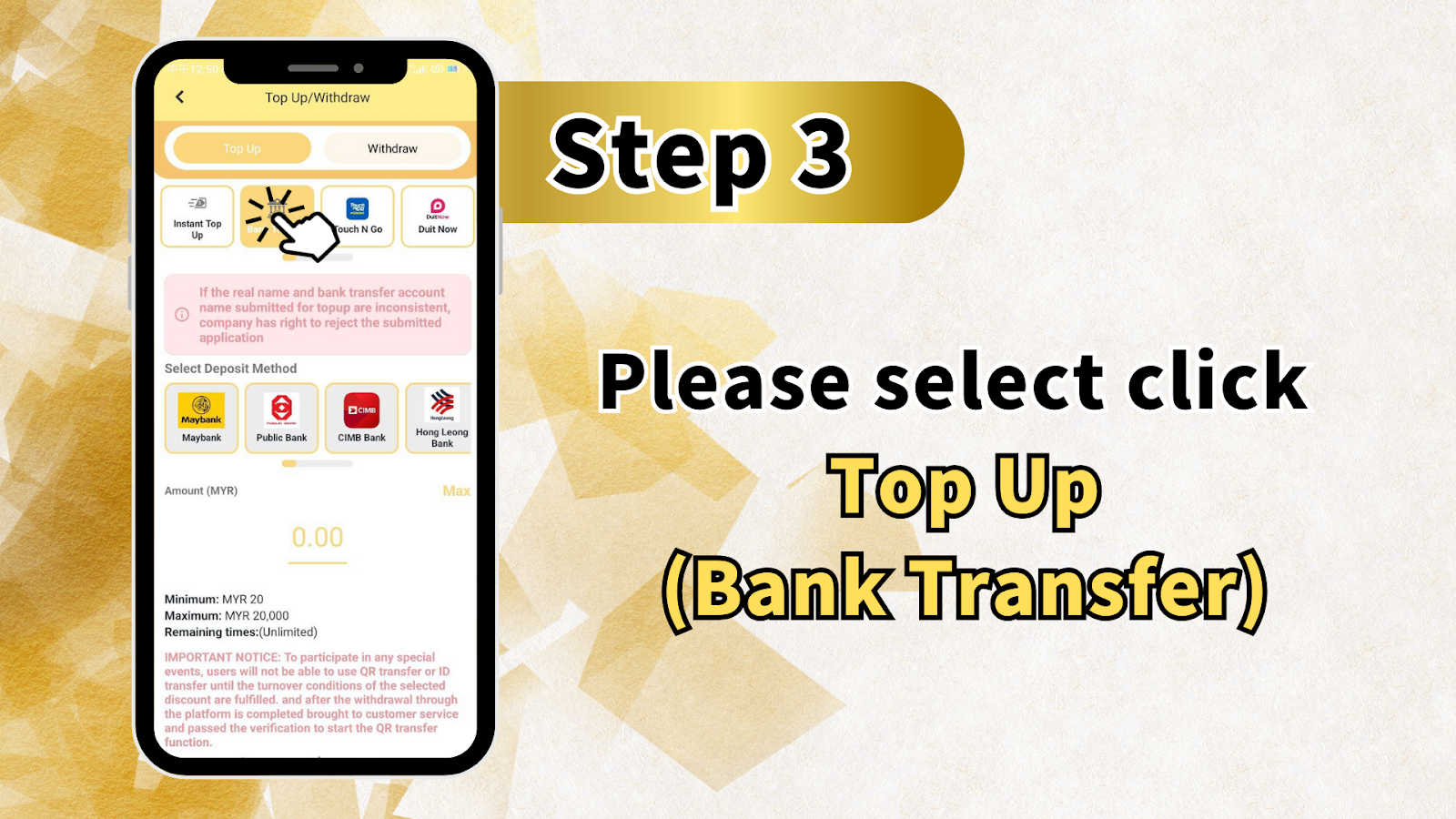
Step 3 - Select Your Deposit Method (Bank Transfer)
On the Top Up/Withdraw page, you will see two tabs: Top Up and Withdraw. Ensure Top Up is selected. Then choose your preferred deposit method from the available options: Maybank, Public Bank, CIMB Bank, or Hong Leong Bank. Click the bank you wish to use for your LUCKYTOWN bank transfer topup.
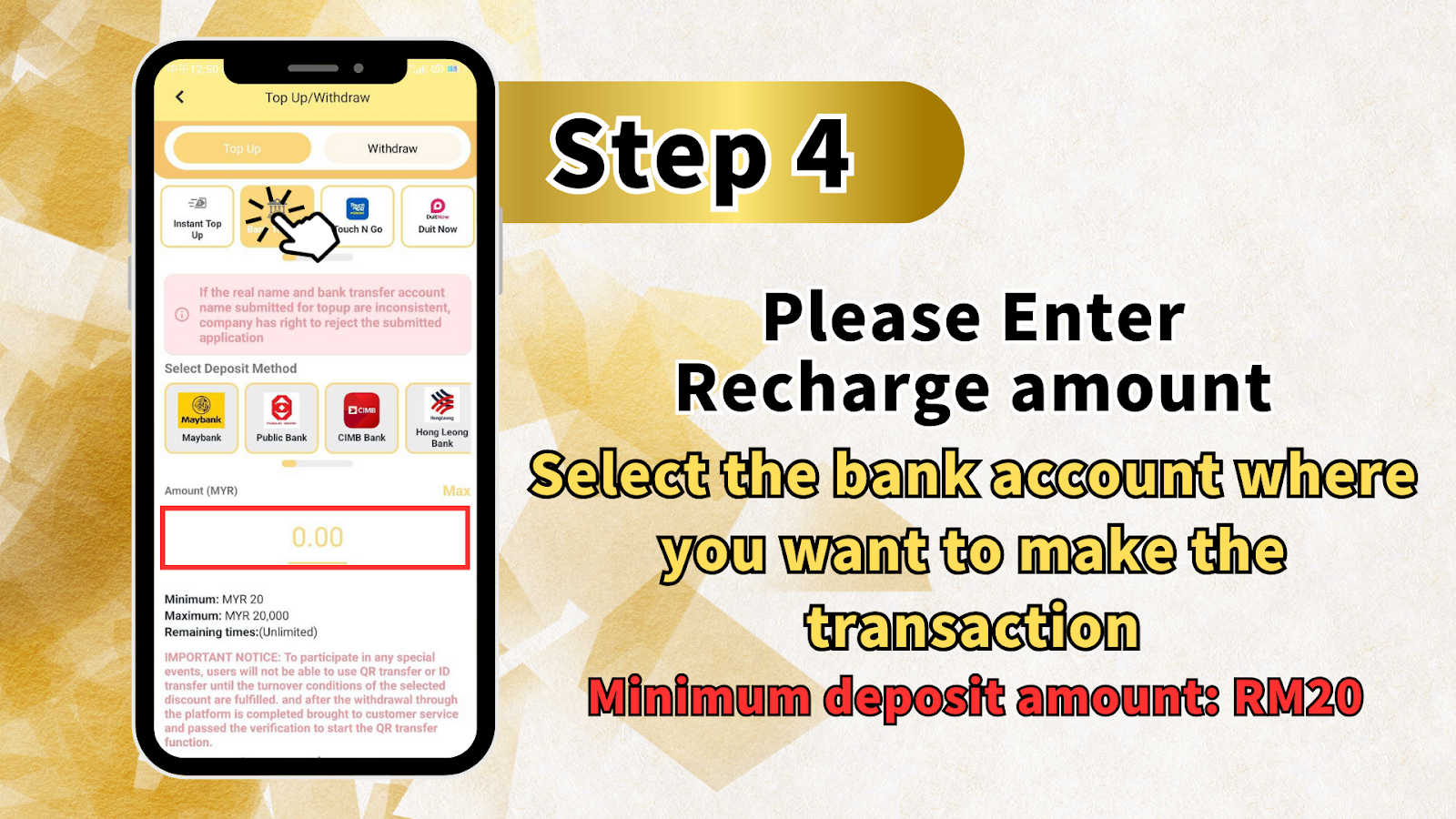
Step 4 - Enter Recharge Amount (Minimum MYR 20, Maximum MYR 20,000)
In the Amount (MYR) field, enter the amount you wish to deposit into your LUCKYTOWN account. Minimum deposit: MYR 20. Maximum deposit: MYR 20,000 per transaction. The remaining time is unlimited, so you can take your time to complete the transfer. Select the bank account where you want to make the transaction from your personal banking app.
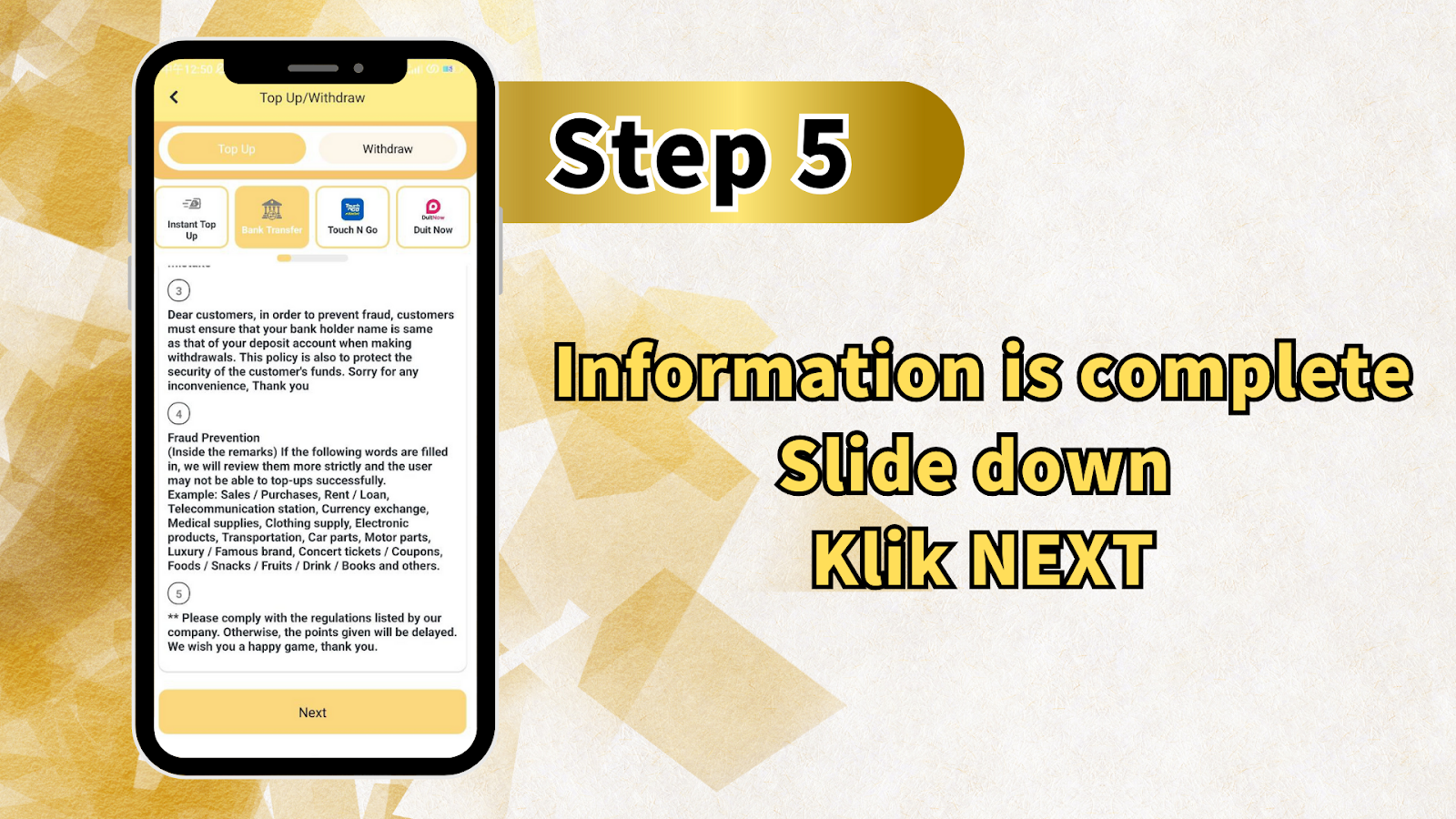
Step 5 - Review Important Notices and Fraud Prevention Rules
Before proceeding, LUCKYTOWN requires you to understand these important rules: 1) If the real name and bank transfer account name submitted for payment are inconsistent, the company has the right to reject the application. 2) Your bank holder name must be the same as your deposit account name for withdrawals (fraud prevention). 3) Do not include prohibited words in transaction remarks such as: Sales/Purchases, Rent/Loan, Telecommunication station, Currency exchange, Medical supplies, Clothing supply, Electronic products, Transportation, Car parts, Motor parts, Luxury/Famous brand, Concert tickets/Coupons, Foods/Snacks/Fruits/Drink/Books, and others. Violations may delay fund crediting.
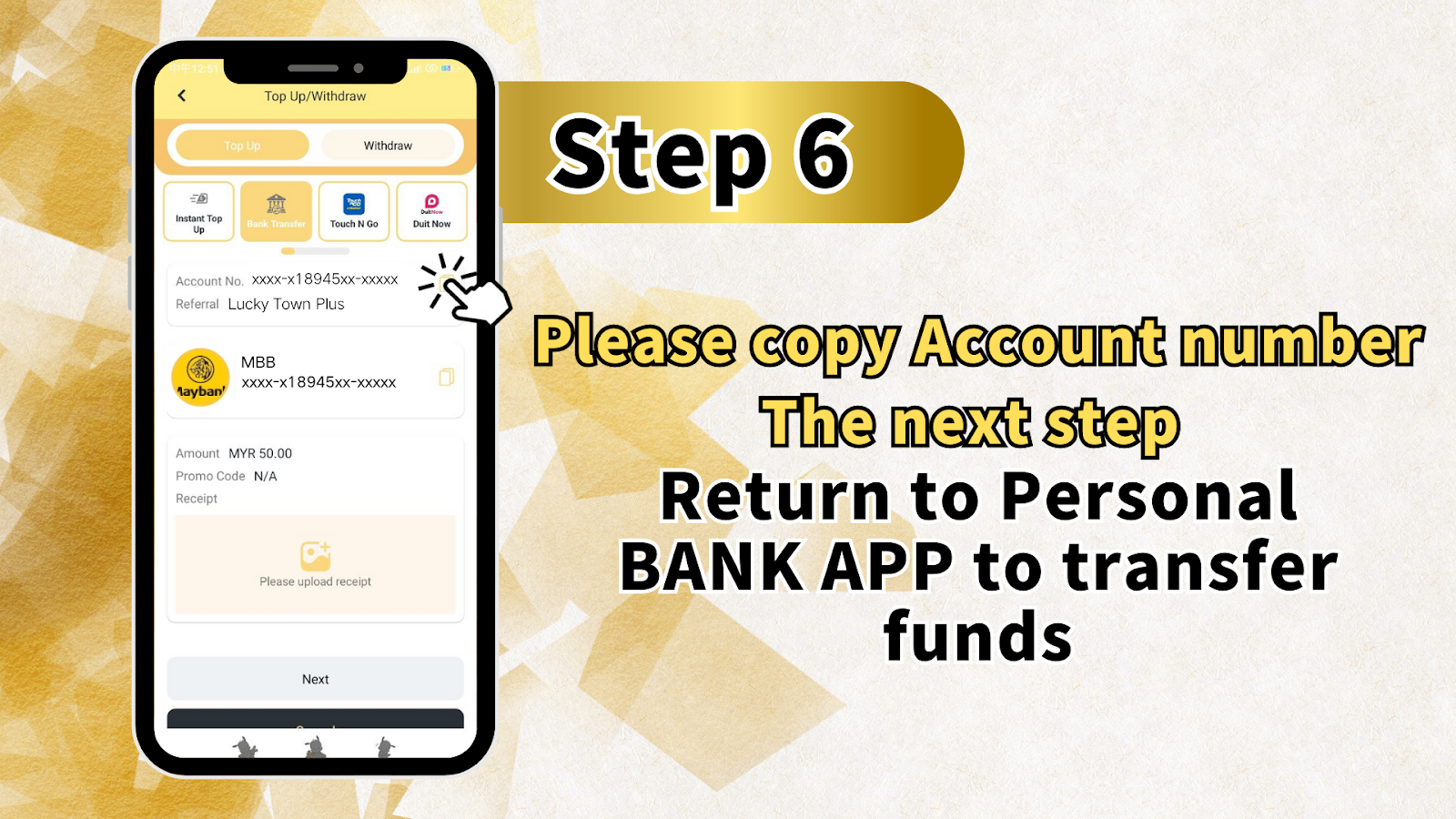
Step 6 - Copy the LUCKYTOWN Bank Account Number
After selecting your deposit method and amount, LUCKYTOWN will display the company's bank account number (e.g., xxxx-x18945xx-xxxxx). Click the "Copy Account Number" button. Then open your banking app(Maybank2u, Public Bank Online, CIMB Clicks, or Hong Leong Connect) to transfer funds to this copied account number.
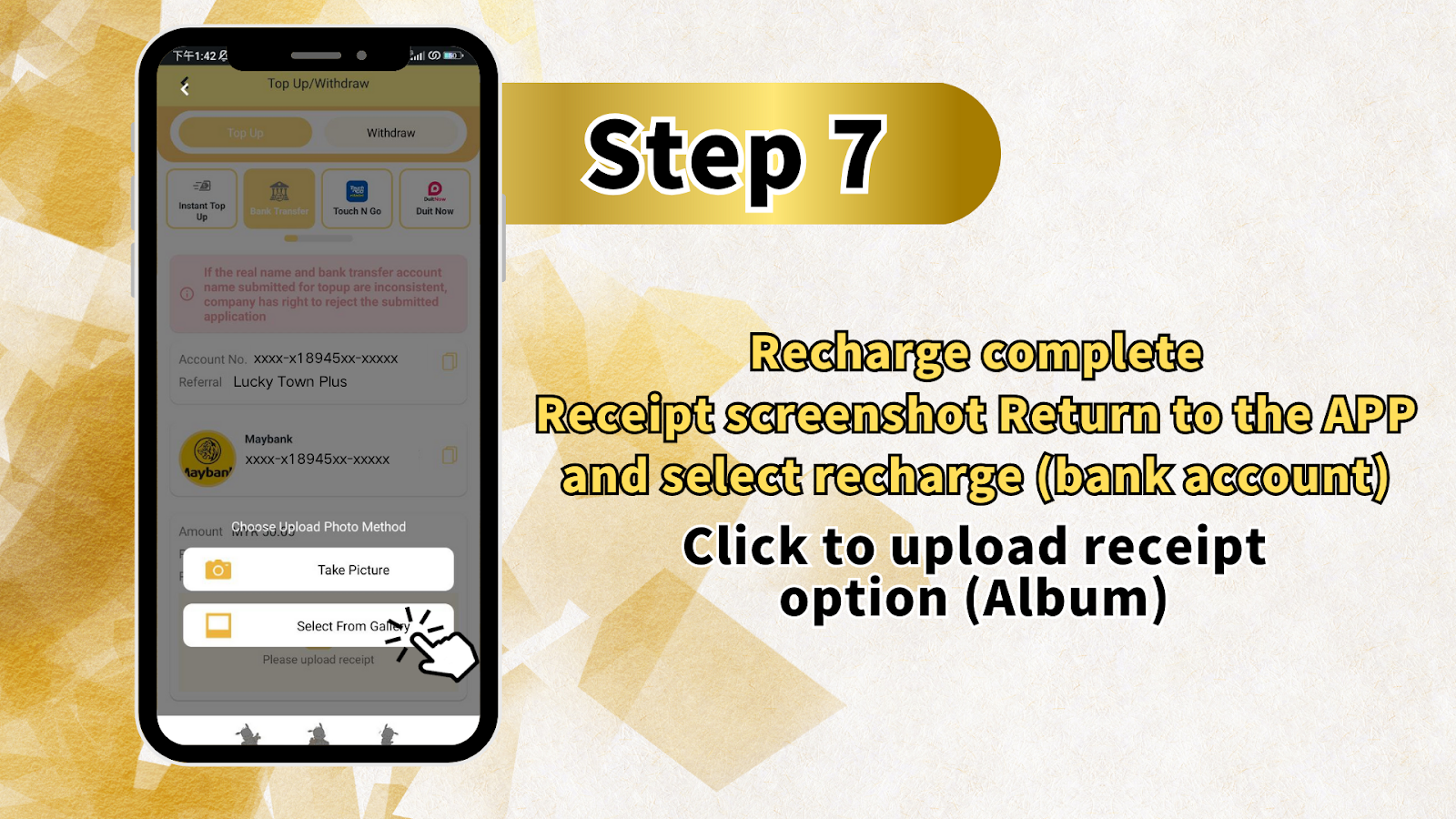
Step 7 - Complete Transfer in Banking App & Upload Receipt
In your banking app, paste the copied LUCKYTOWN account number and enter the exact deposit amount. Complete the transfer using your bank's usual process (TAC, SecureSign, etc.). After successful transfer, take a screenshot or save the transaction receipt. Return to the LUCKYTOWN app/website, select "Recharge (Bank Account)", and click "Upload Receipt" - choose the screenshot from your album.
Step 8 - Confirm Deposit Details
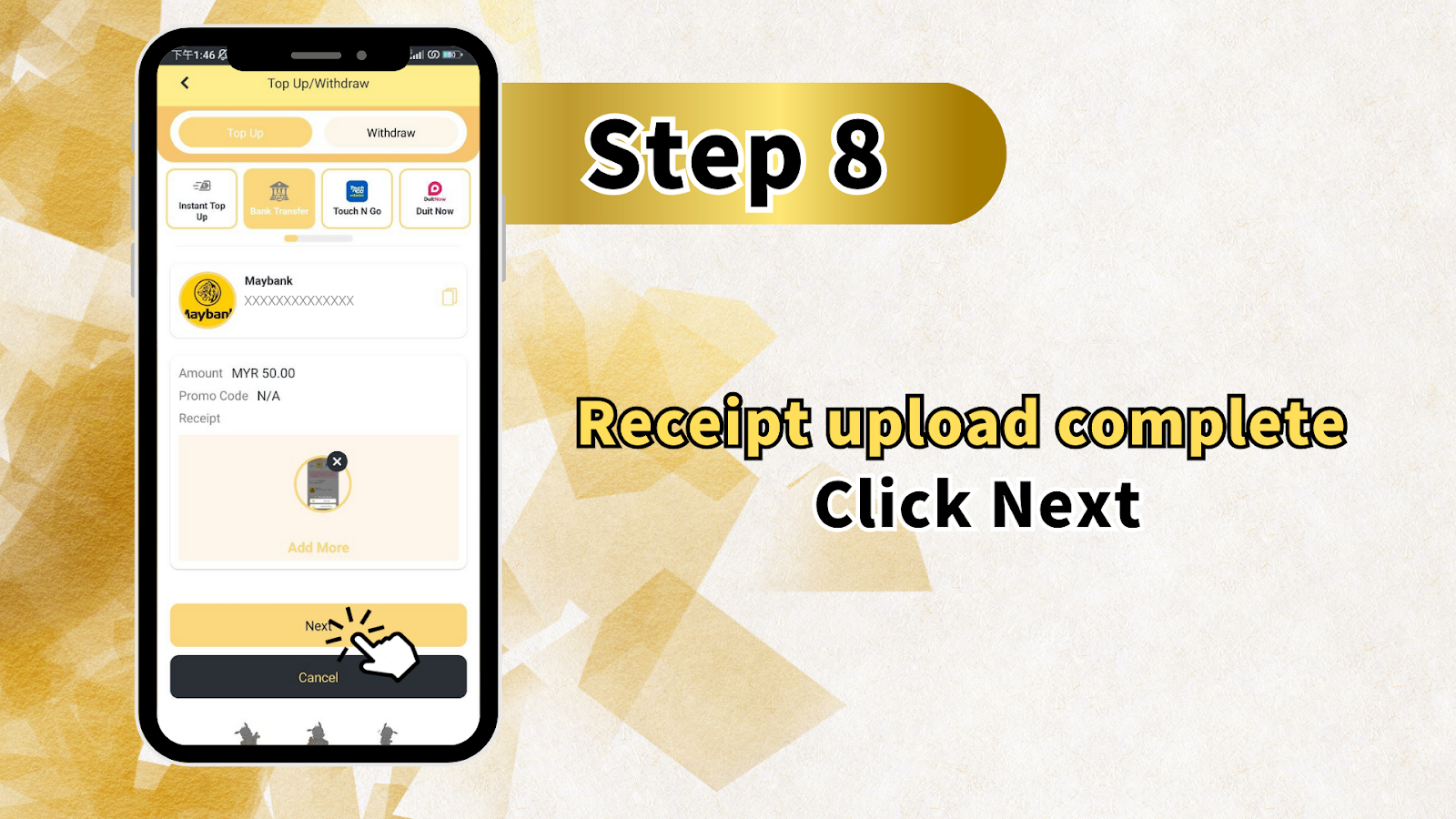
After uploading the receipt, review the deposit details: Amount (MYR) - confirm the amount you transferred (e.g., MYR 50.00). Promo Code - leave as N/A unless you have a valid promo code. Receipt - verify the uploaded image is correct. Click "Next" or "Add More" if you have additional receipts. Finally, click "Confirm" or "Submit" to send your topup request to LUCKYTOWN.
Step 9 - Wait for Processing (Within 10 Minutes)
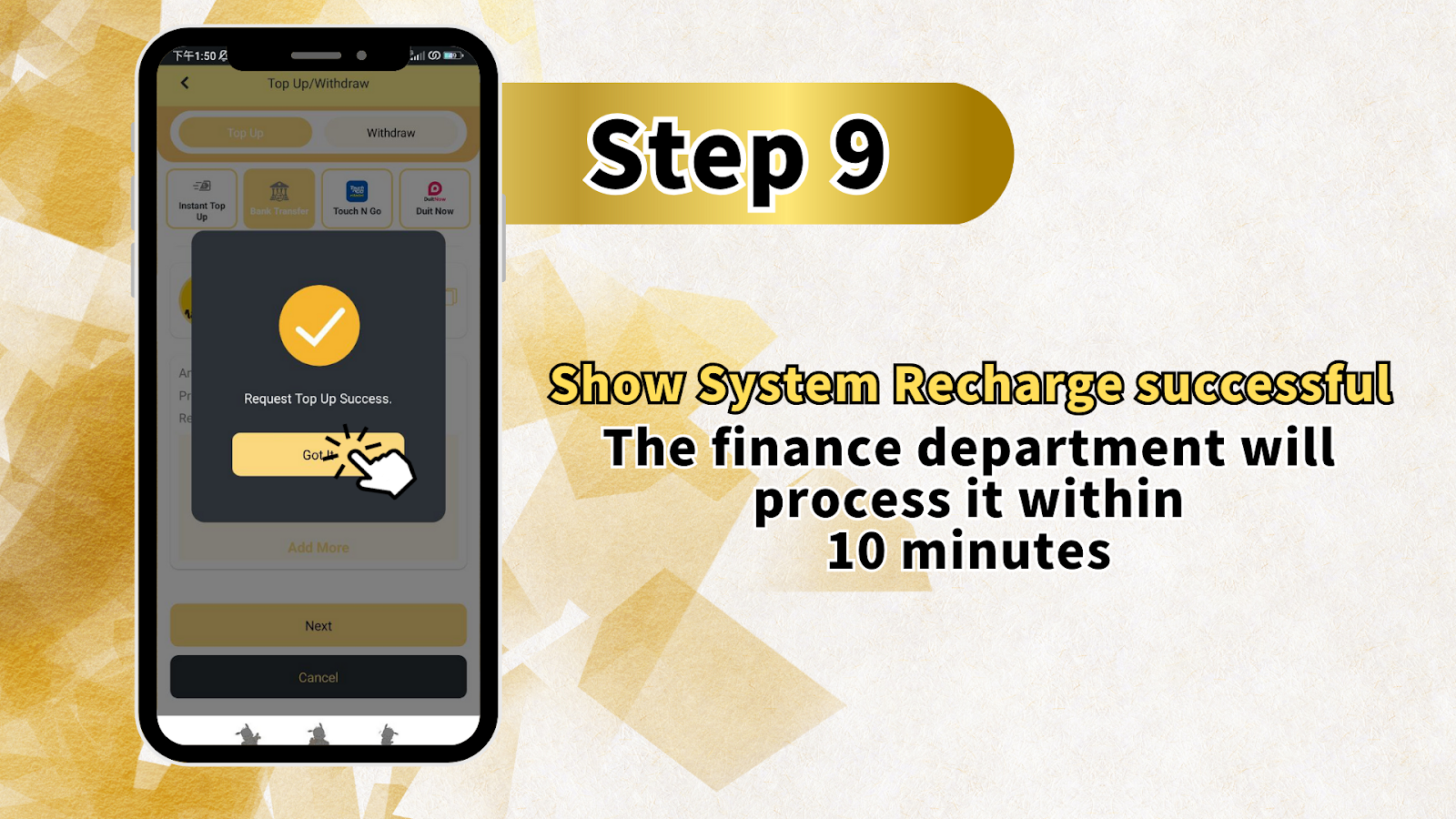
After submitting, the LUCKYTOWN system will display: "System Recharge Successful". The finance department will process your bank transfer topup within 10 minutes. Once processed, the deposited funds will be credited to your LUCKYTOWN account balance. You will receive a confirmation notification.
LUCKYTOWN Bank Transfer Topup - Important Rules & Limits
Deposit Limits: MYR 20 - MYR 20,000
LUCKYTOWN bank transfer topup has a minimum deposit of MYR 20 and a maximum deposit of MYR 20,000 per transaction. For larger deposits, you may make multiple transactions or contact customer support for higher limits.
Supported Banks for LUCKYTOWN Topup
LUCKYTOWN supports bank transfers from major Malaysian banks: Maybank, Public Bank, CIMB Bank, and Hong Leong Bank. Other banks may be supported through interbank transfers (GIRO/IBG), but direct transfers from these four banks process fastest.
Real Name Matching Requirement
LUCKYTOWN strictly enforces a real name matching policy. The bank account holder name used for topup must exactly match the real name registered on your LUCKYTOWN account. Any inconsistency will result in rejection of the deposit application. This policy protects customer funds from fraud.
Prohibited Transaction Remarks
To prevent fraud and ensure smooth processing, LUCKYTOWN prohibits certain keywords in transaction remarks. Do NOT include words related to: Sales/Purchases, Rent/Loan, Telecommunication, Currency exchange, Medical supplies, Clothing, Electronics, Transportation, Car/Motor parts, Luxury brands, Concert tickets, Coupons, Food, Snacks, Fruits, Drinks, or Books. Violations will trigger strict reviews and may cause topup delays or rejection.
Special Event Restrictions on QR/ID Transfer
If you participate in any LUCKYTOWN special events (e.g., welcome bonuses, rebate promotions), you will not be able to use QR transfer or ID transfer until you have fulfilled the turnover conditions of the selected discount. After completing the turnover and making a withdrawal, contact customer service to pass verification and re-enable QR transfer functions.
Why Use LUCKYTOWN Bank Transfer Topup?
Fast Processing Within 10 Minutes
LUCKYTOWN's finance department processes bank transfer topups within 10 minutes of receipt upload confirmation. Most deposits are credited even faster during business hours.
No Transaction Fees
LUCKYTOWN does not charge any fees for bank transfer topups. However, your bank may impose interbank transfer fees (typically RM0.50 - RM2.00) depending on your account type.
Secure Fraud Prevention
The real name matching policy and prohibited remarks list protect both LUCKYTOWN and its players from fraudulent transactions, money laundering, and unauthorized deposits. Your funds are safe.
What Is the Minimum Bank Transfer Topup Amount on LUCKYTOWN?
The minimum LUCKYTOWN bank transfer topup amount is MYR 20. Amounts below MYR 20 will not be accepted. Always check that you meet the minimum before initiating a transfer.
Which Banks Can I Use for LUCKYTOWN Bank Transfer Topup?
LUCKYTOWN directly supports Maybank, Public Bank, CIMB Bank, and Hong Leong Bank. You can also use other Malaysian banks via interbank transfer (GIRO/IBG), but processing may take slightly longer.
Why Was My LUCKYTOWN Bank Transfer Topup Rejected?
Common reasons for rejection: 1) Real name mismatch between bank account and LUCKYTOWN account. 2) Deposit amount below MYR 20. 3) Prohibited keywords in transaction remarks. 4) Uploaded receipt is unclear or does not match the transfer. Correct the issue and resubmit.
How Long Does LUCKYTOWN Take to Credit Bank Transfer Topups?
After you upload the receipt, the LUCKYTOWN finance department typically processes the topup within 10 minutes. During peak hours or weekends, processing may take up to 30 minutes. Contact customer support if your deposit is not credited after 1 hour.
Can I Use QR Transfer Instead of Bank Transfer on LUCKYTOWN?
Yes, LUCKYTOWN supports QR transfer. However, if you are participating in a special event (e.g., welcome bonus), QR transfer may be temporarily disabled until you complete the turnover requirements. Bank transfer topup remains available during this time.
What Happens If I Include Prohibited Words in My LUCKYTOWN Transfer Remark?
Including prohibited keywords (e.g., "Sales", "Rent", "Currency exchange", "Food") will trigger a strict review by LUCKYTOWN. Your topup may be delayed or rejected entirely. Always leave the remark field blank or use a neutral term like "Topup" or "Deposit".
Ready to Fund Your LUCKYTOWN Account? Start Bank Transfer Topup Now
Follow the 9-step guide above to deposit between MYR 20 and MYR 20,000 via Maybank, Public Bank, CIMB, or Hong Leong Bank. New to LUCKYTOWN? Register first, then complete your first topup to claim welcome bonuses. Existing members: log in and recharge now.
Start LUCKYTOWN Bank Transfer Topup