
DuitNow Deposit at LUCKYTOWN PLUS - Complete Guide

Why Use DuitNow for Deposits at LUCKYTOWN PLUS?

Step 1 - Click "ME" on the Bottom Right Corner of the Main Page
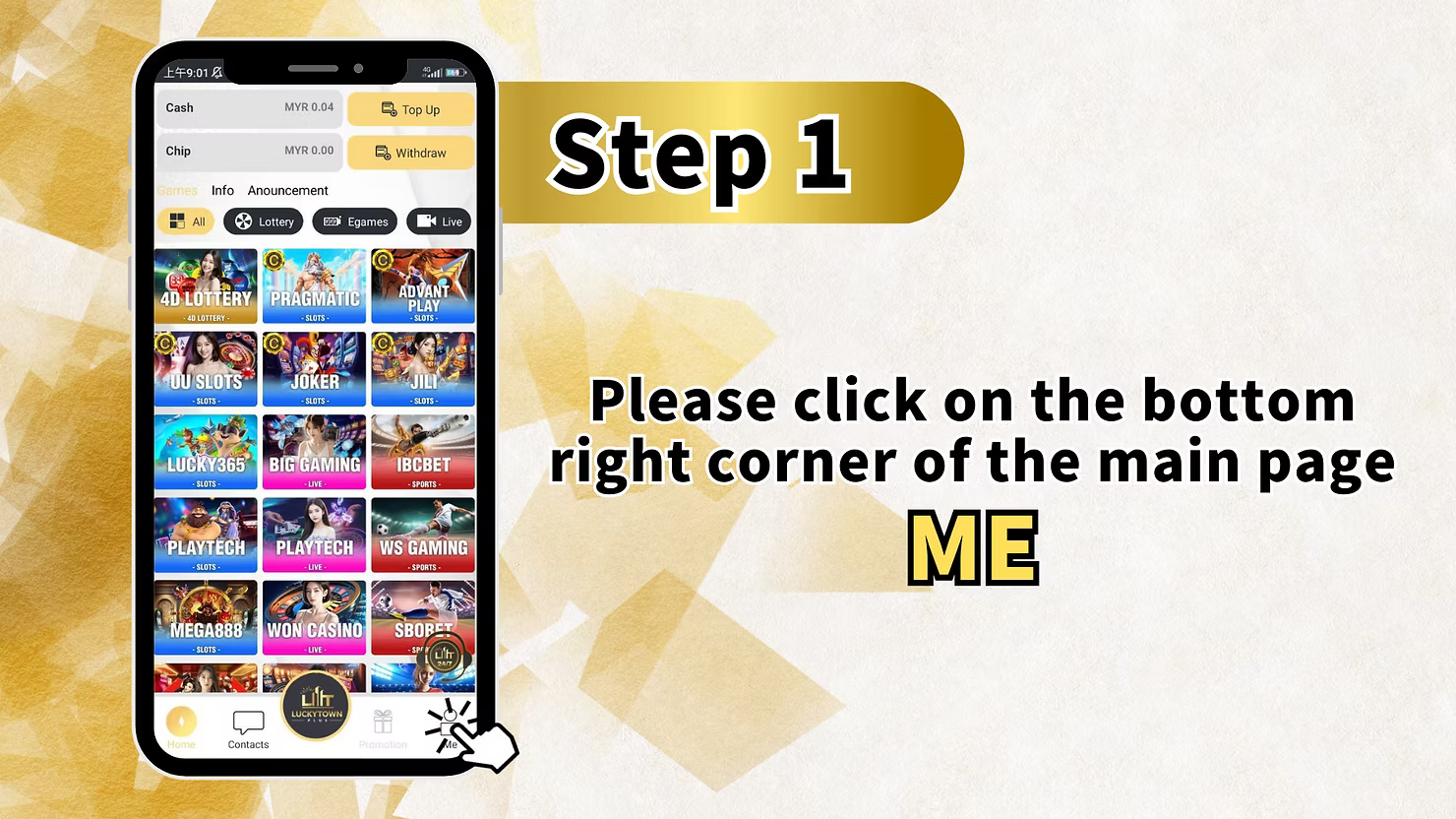
To start your LUCKYTOWN DuitNow topup, first log in to your account. On the main page (dashboard), look at the bottom right corner and click the "ME" icon. This opens your personal account menu where you can access Cash, Chip, Games, Info, Announcement, Top Up, Withdraw, and various game provider shortcuts.
Step 2 - Select "Deposit / Withdrawal" (Top Up/Withdraw)
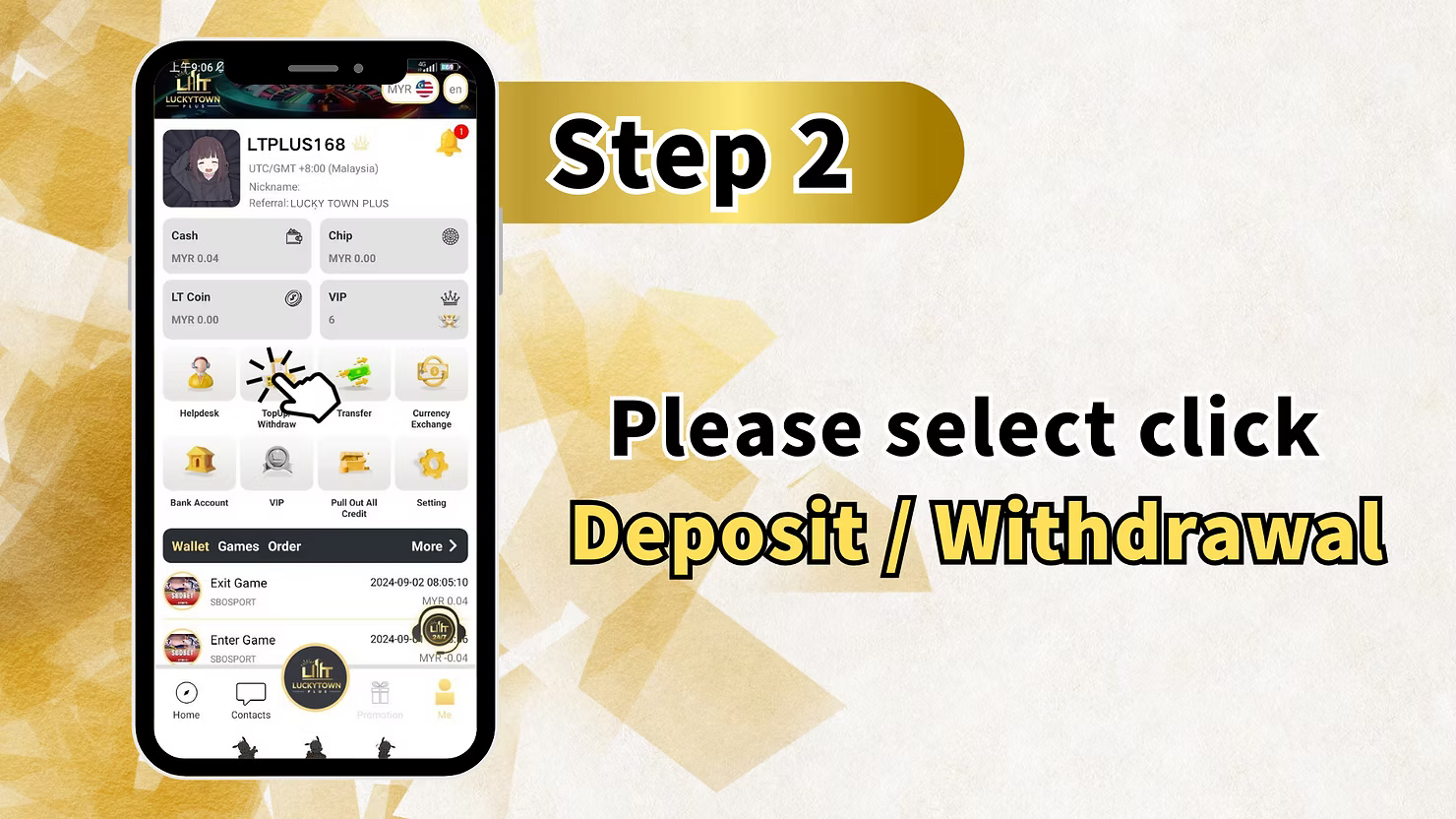
After entering the "ME" section, click on "Deposit / Withdrawal" (also labeled as Top Up/Withdraw). This will take you to the banking page where you can manage all your fund transactions including deposits, withdrawals, and viewing transaction history.
Step 3 - Select DuitNow and Choose Upay / GoPay / SpeedPay
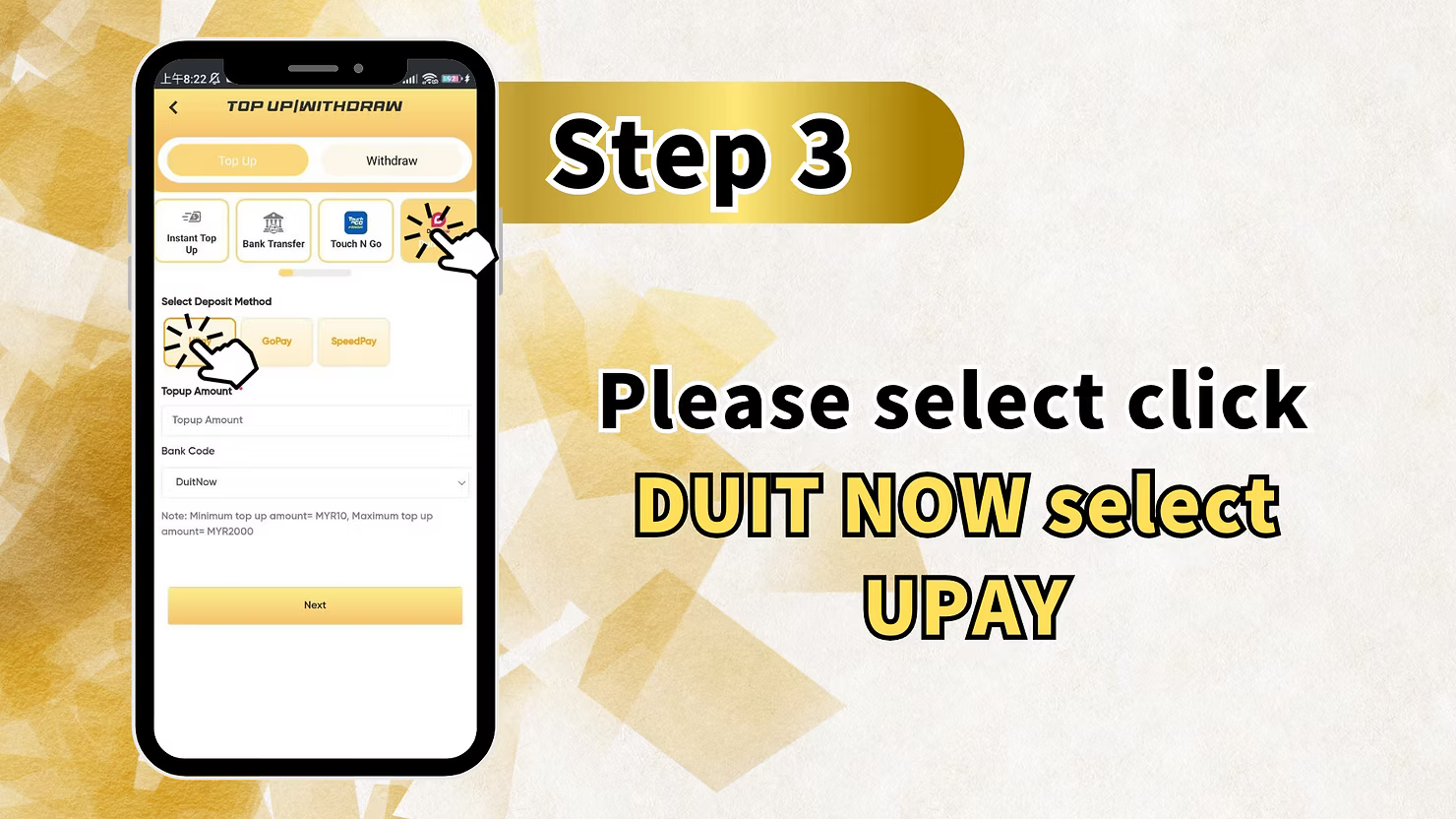
On the Top Up page, select DuitNow as your deposit method. Then choose your preferred payment channel from Upay, GoPay, or SpeedPay. Note: Minimum topup amount for these methods is MYR 100. Maximum topup amount is MYR 2,000 per transaction. The Bank Code will show as "DuitNow". Click "Next" to proceed.
Step 4 - Fill in Recharge Amount (Minimum MYR 100)
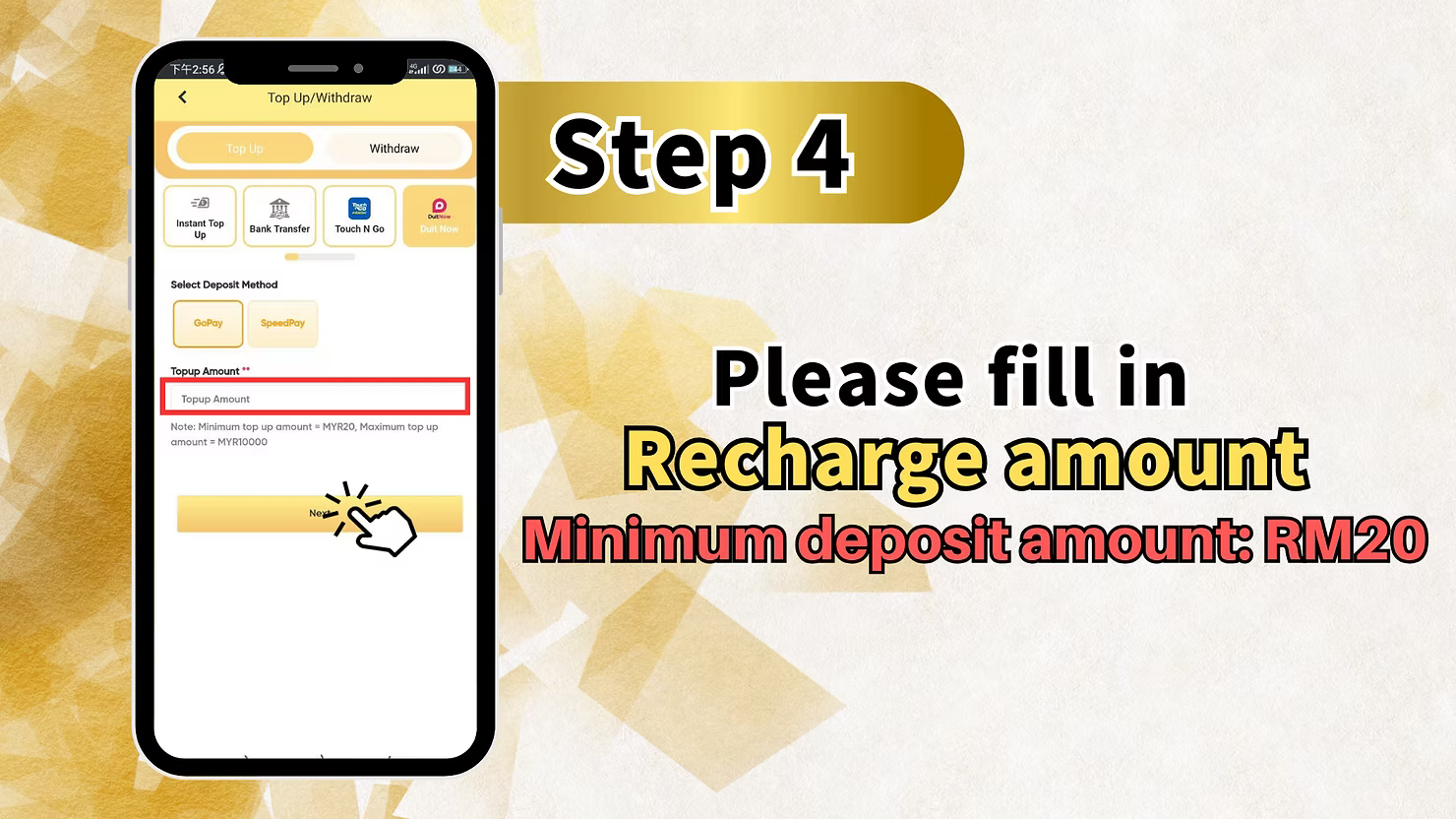
In the recharge amount field, enter the amount you wish to deposit into your LUCKYTOWN account via DuitNow. Minimum deposit: MYR 100. Maximum deposit: MYR 2,000 per transaction. Double-check your amount before proceeding to QR code generation.
Step 5 - Scan the DuitNow QR Code and Complete Payment
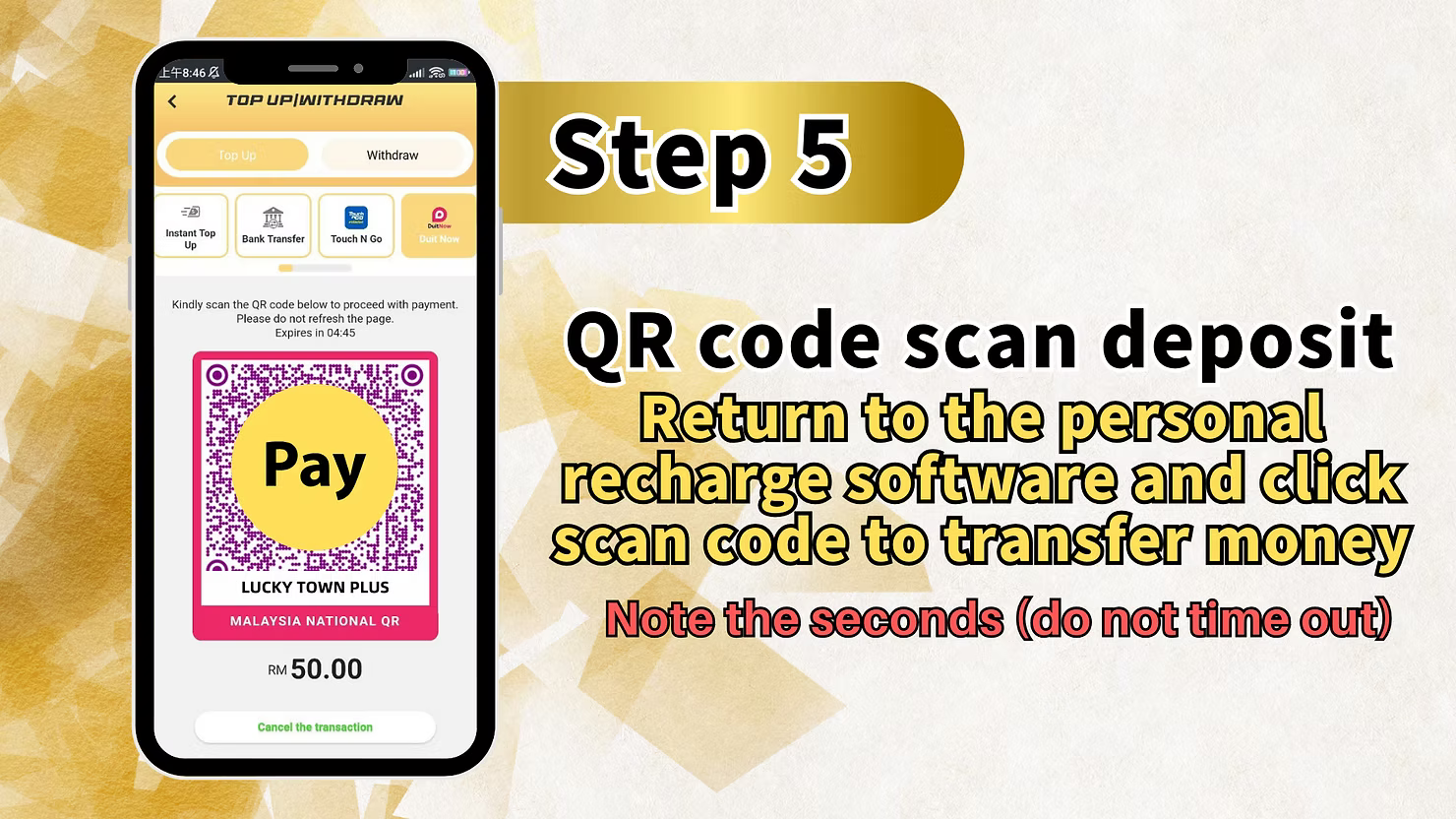
LUCKYTOWN will generate a DuitNow QR code (Malaysia National QR). Open your banking app or e-wallet that supports DuitNow QR, such as Touch 'n Go, MAE, Boost, or any bank app. Scan the QR code displayed on the LUCKYTOWN screen. Enter the exact recharge amount. Although an on-screen example may show RM 50.00, the actual minimum for this method is MYR 100. Note the countdown timer and do not let it time out. Complete the payment using your app authentication method. Important: The QR code is for one-time use only.
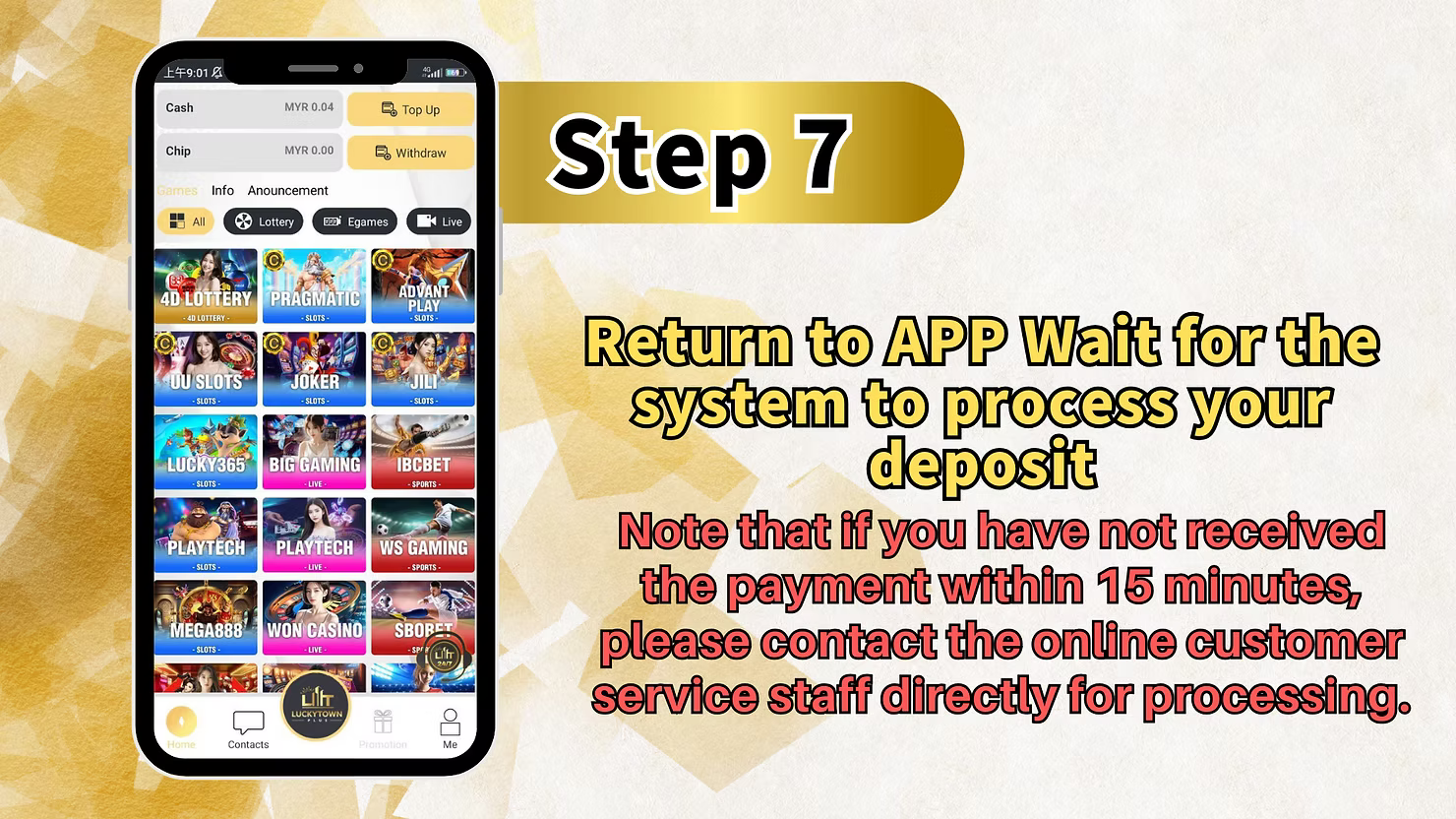
Step 6 - Return to LUCKYTOWN App and Wait for Processing
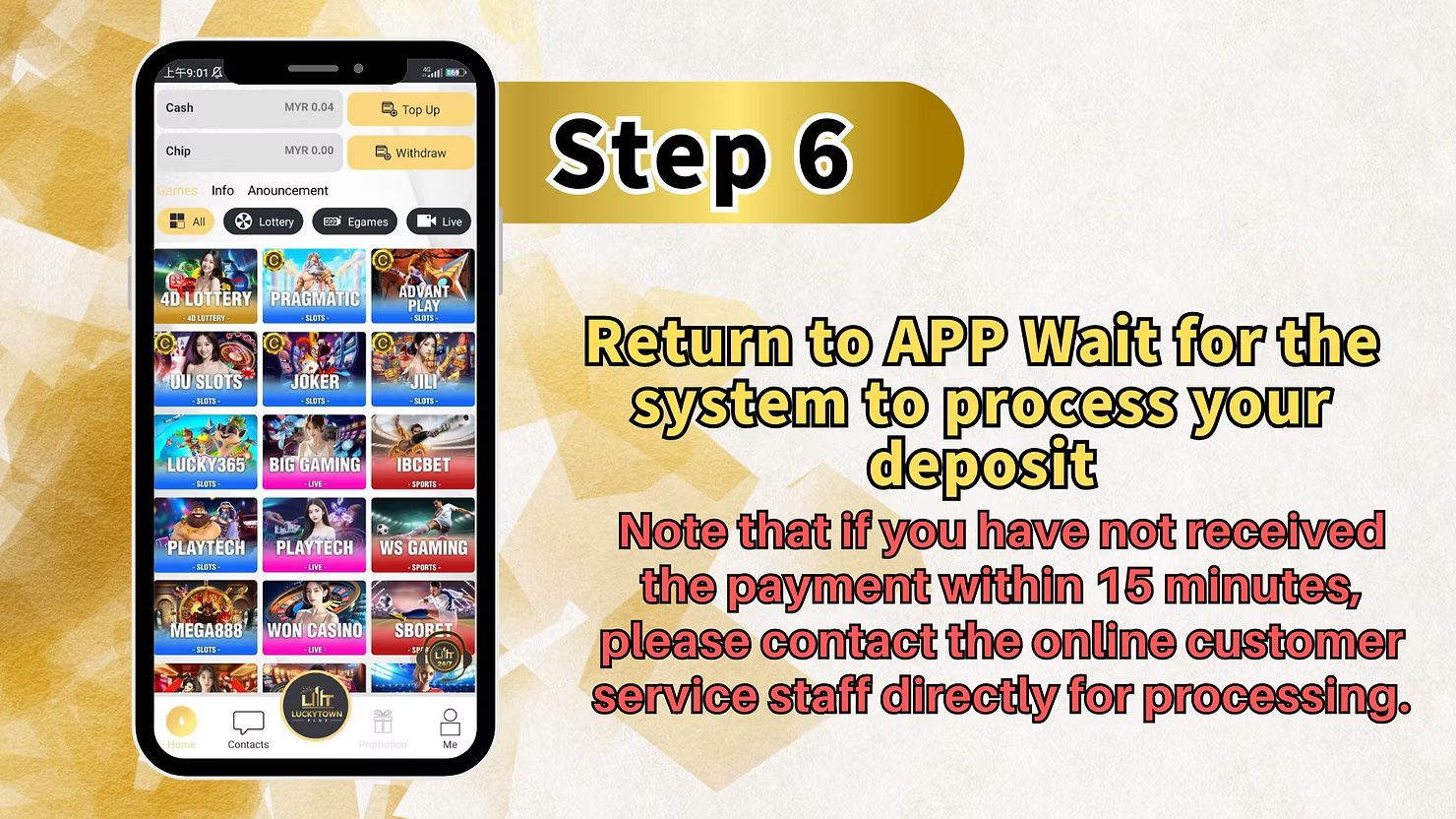
After completing the payment in your banking app, return to the LUCKYTOWN app or website. The system will automatically process your DuitNow topup. If you have not received the payment credit within 15 minutes, contact LUCKYTOWN online customer service directly for assistance. Do not make a second payment before contacting support.
Method 2: LUCKYTOWN DuitNow Topup (Standard QR - MYR 20 Minimum)

Step 1 - Click "ME" on the Bottom Right Corner of the Main Page
Log in to your LUCKYTOWN account and click the "ME" icon on the bottom right corner of the main page, as described in Method 1.
Step 2 - Select "Deposit / Withdrawal" (Top Up/Withdraw)
Click on "Deposit / Withdrawal" to access the banking page, same as Method 1 Step 2.
Step 3 - Select DuitNow (Standard Method)
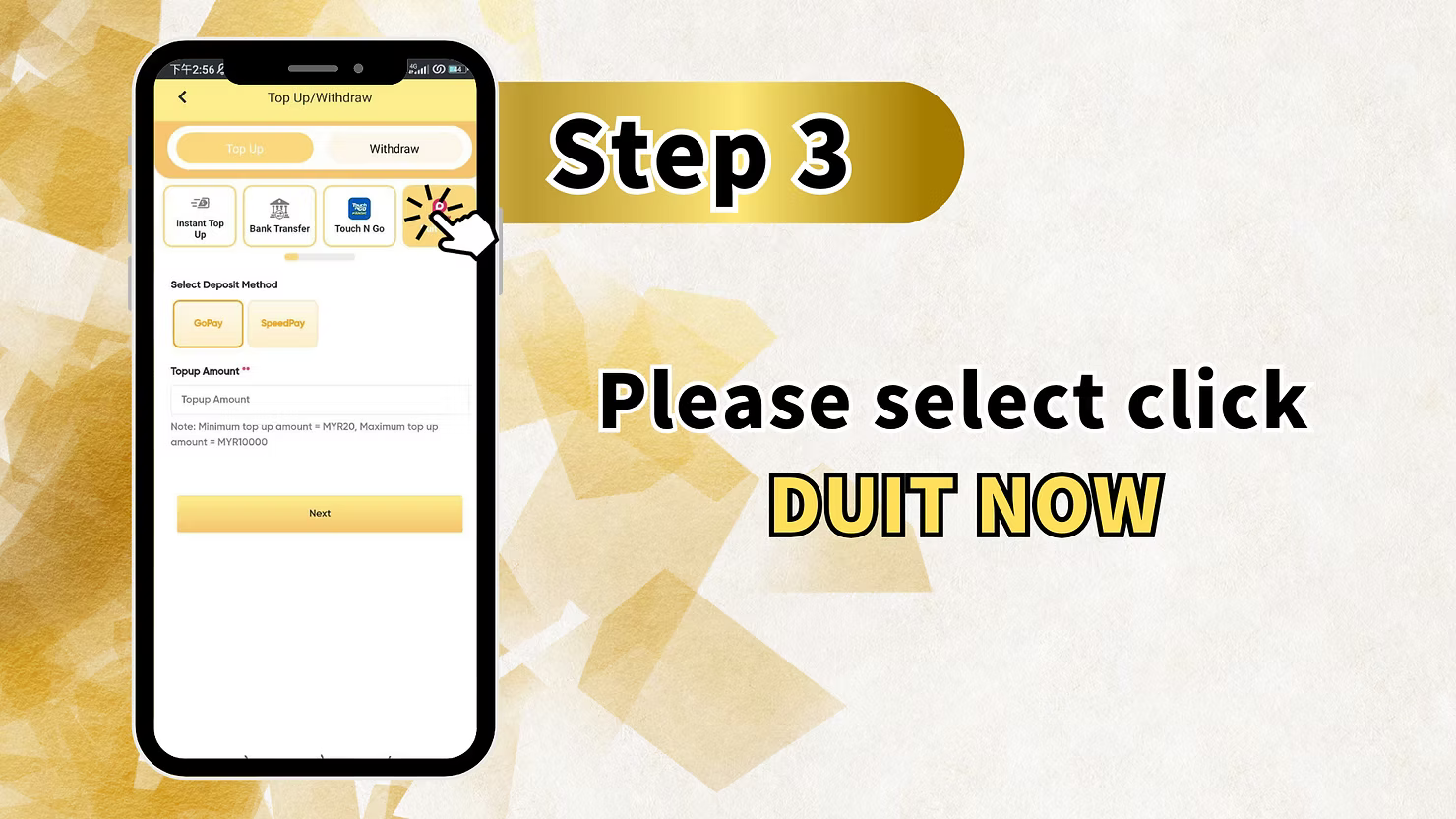
On the Top Up page, select DuitNow as your deposit method. Unlike Method 1, you may see a standard DuitNow option without the Upay, GoPay, or SpeedPay specific selection. Click on DuitNow to proceed.
Step 4 - Fill in Recharge Amount (Minimum MYR 20)
Enter the amount you wish to deposit. Minimum deposit: MYR 20. Maximum depends on your account level and bank limits. The platform does not recommend using ShopeePay for deposits. Make sure you use a supported bank app or e-wallet such as Touch 'n Go, MAE, or Boost.
Step 5 - Scan QR Code and Fill in Trading Account Name
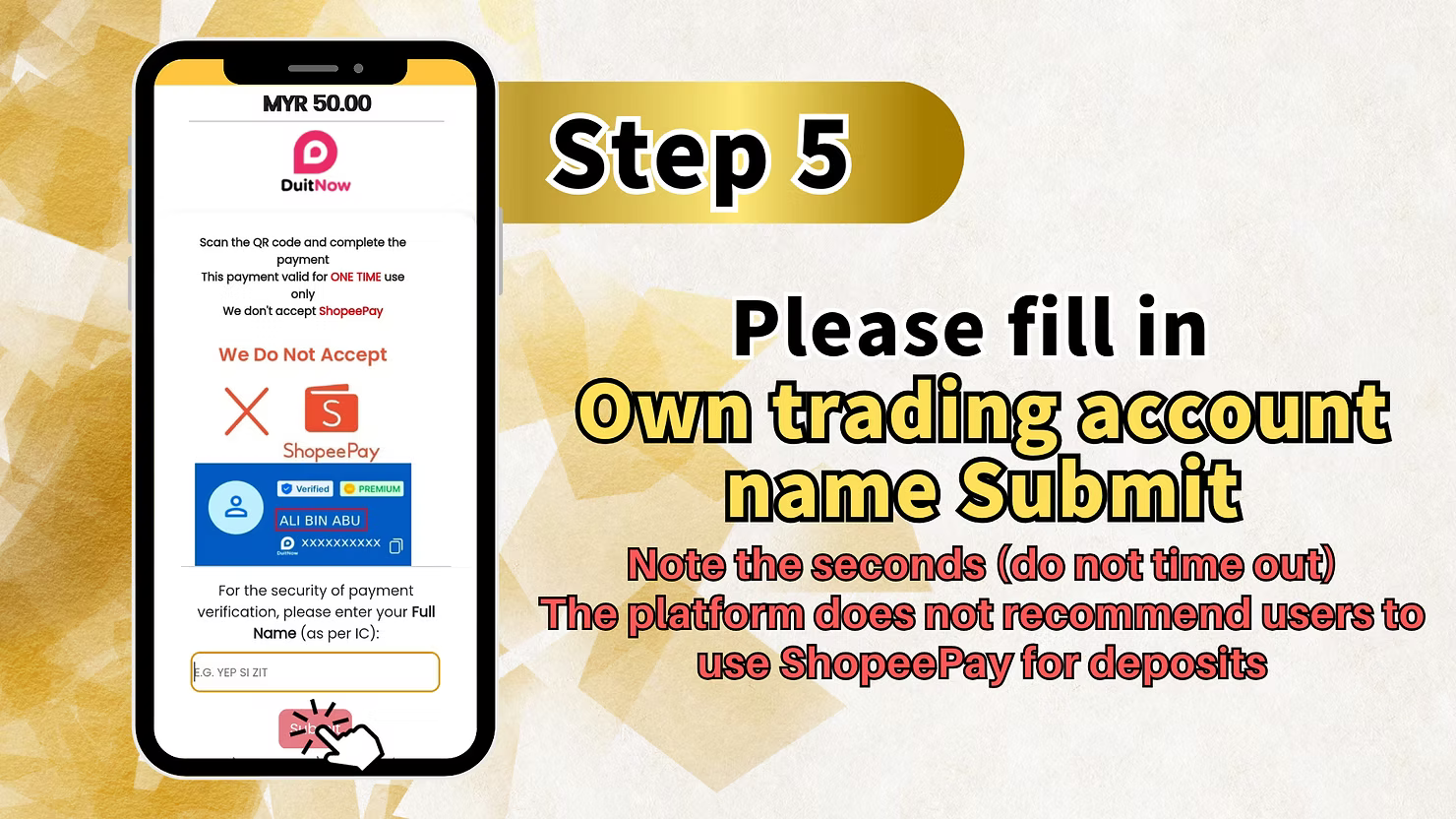
LUCKYTOWN will generate a one-time use DuitNow QR code with an expiry timestamp. Open your banking app or DuitNow-supported e-wallet and scan the QR code. Complete the payment before the countdown timer expires. After scanning, you may need to fill in your trading account name as requested. We do not accept ShopeePay. Click "Submit" after completing the payment details.
Step 6 - Return to APP and Wait for Processing (Within 15 Minutes)
After completing the QR code payment, return to the LUCKYTOWN app. The system will process your DuitNow topup. If you have not received the payment within 15 minutes, contact LUCKYTOWN online customer service directly for processing. Keep your transaction receipt or screenshot as proof.
LUCKYTOWN DuitNow Topup - Important Rules & Limits Comparison
Method 1 (Upay/GoPay/SpeedPay): MYR 100 - MYR 2,000
This LUCKYTOWN DuitNow topup method uses specific payment channels such as Upay, GoPay, and SpeedPay. Minimum: MYR 100. Maximum: MYR 2,000. Best for medium-to-large deposits. The QR code is one-time use only.
Method 2 (Standard DuitNow QR): MYR 20 - Higher Limits
This standard LUCKYTOWN DuitNow topup method uses the Malaysia National QR system. Minimum: MYR 20. Maximum varies by bank or e-wallet, typically around MYR 5,000 to MYR 20,000. Suitable for smaller deposits.
Real Name Matching Requirement
LUCKYTOWN strictly enforces a real name matching policy. The bank account holder name or e-wallet holder name used for DuitNow topup must exactly match the real name registered on your LUCKYTOWN account. Any inconsistency may result in rejection or delayed processing.
One-Time Use QR Code - Do Not Time Out
Each LUCKYTOWN DuitNow QR code is valid for one transaction only and has a countdown timer, usually around 4 to 5 minutes. If the timer expires, the QR code becomes invalid and you must generate a new QR code before trying again.
ShopeePay Not Accepted
LUCKYTOWN explicitly states that ShopeePay is not accepted and is not recommended for deposits. Use Touch 'n Go, MAE, Boost, or any major Malaysian banking app such as Maybank, Public Bank, CIMB, Hong Leong, or RHB that supports DuitNow QR.
Why Use LUCKYTOWN DuitNow Topup?
Fast Processing - No Manual Receipt Upload Needed
Unlike bank transfers that require receipt screenshots, LUCKYTOWN DuitNow topup is often automatically detected after QR code payment. Processing typically completes within seconds to minutes.
No Need to Enter Account Numbers
DuitNow QR reduces the risk of typing mistakes. Simply scan, confirm the amount, and pay. This is faster and more accurate than manual bank transfers.
Wide Support Across Banks and E-Wallets
DuitNow QR is supported by major Malaysian banks and e-wallets, including Maybank, Public Bank, CIMB, Hong Leong, RHB, Touch 'n Go, MAE, and Boost. You can use the payment method that suits you best.
What Is the Minimum DuitNow Topup Amount on LUCKYTOWN?
The minimum depends on the method. Standard DuitNow QR starts from MYR 20. Upay, GoPay, and SpeedPay under Method 1 start from MYR 100. Check the deposit screen for the exact minimum shown for your selected method.
Can I Use ShopeePay for LUCKYTOWN DuitNow Topup?
No. LUCKYTOWN explicitly states that ShopeePay is not accepted and is not recommended for deposits. Use Touch 'n Go, MAE, Boost, or another major bank app instead.
How Long Is the LUCKYTOWN DuitNow QR Code Valid?
Each LUCKYTOWN DuitNow QR code has a countdown timer, usually about 4 to 5 minutes. You must complete the payment before the timer expires. If it times out, generate a new QR code on the LUCKYTOWN deposit page.
Why Was My LUCKYTOWN DuitNow Topup Not Credited?
Common reasons include the QR code timing out before payment, a real name mismatch, using ShopeePay, or bank and e-wallet technical issues. If the payment is not credited within 15 minutes, contact LUCKYTOWN customer service with your transaction receipt.
What Happens If I Don't Receive Credit Within 15 Minutes?
LUCKYTOWN advises users to contact online customer service staff directly for processing if the payment is not credited within 15 minutes. Do not make a second deposit before support checks the first one.
Is the DuitNow QR Code Reusable?
No. Each LUCKYTOWN DuitNow QR code is for one-time use only. After a successful or failed transaction, you must generate a new QR code for your next deposit.
Ready to Fund Your LUCKYTOWN Account? Start DuitNow Topup Now
Choose between Standard DuitNow QR (MYR 20 minimum) or Upay, GoPay, and SpeedPay (MYR 100 minimum). Fast processing with no manual receipt upload. New to LUCKYTOWN? Register first, then complete your first DuitNow topup. Existing members can log in and scan to deposit instantly.
Start LUCKYTOWN DuitNow Topup